
Imagine building a powerful computer that fits on your desk without taking up much space. That’s the magic of Mini ITX PCs! But finding the perfect case for these tiny titans can feel like searching for a needle in a haystack. So many choices, so many things to consider – it can be a real headache.
You want a case that looks good, keeps your computer cool, and doesn’t cost a fortune. But figuring out which one does all of that can be confusing. Will it fit all your parts? Is it easy to build in? These are the questions that keep PC builders up at night.
This post is here to help! We’ll break down the world of Mini ITX PC cases, making it easy for you to understand. You’ll learn what to look for, discover amazing options, and finally feel confident in choosing the case that’s just right for your dream build. Get ready to build a small PC that packs a big punch!
Top Mini Itx Pc Cases Recommendations

- Ample Interior: Explore ample interior space for Micro-ATX or Mini-ITX motherboards, ensuring easy and future expansion
- Components Clearance: Accommodates CPU coolers with a max height of 159mm, GPU cards up to 360mm, and PSU up to 160mm in length.
- Versatile Cooling: Maximize cooling performance with a 240mm liquid cooler and 5 fans.

- Compact 26.3L Design, Big Hardware Support: Accommodates mATX/ITX motherboards with 4 expansion slots and GPUs up to 415mm—achieve a compact footprint without sacrificing performance.
- High Airflow Steel Mesh Panels: Designed with steel mesh side and top panels for optimal airflow, making it perfect for high-TDP GPUs and radiator setups.
- Supports 360mm Radiators and Up to 10 x 120mm Fans: Capable of housing a 360mm radiator and multiple 120mm fans—include a simple fan/radiator placement diagram in the images for clarity.

- JONSBO TK-0 BLACK Separated Cabinet Mini ITX Pc Case, ITX Desktop sff case,compact -Easy horizontal and vertical desktop placement,Walnut Wood.
- 【2.5 surface curved glass perspective】, suitable for desktop multi-angle arbitrary place ment of display surface
- 【Design material characteristics】: *Aluminum alloy + steel +16mm Wood veneer+ 270° Dual-Curved Glass side view- multi-angle hardware display(No need to remove the protective film when using) *Removable Al PCI cover for easy removal of GPU. *Dual warehouse structure,easy to manage cables and hardware Easier to build your PC,More convenient.

- 【Ultra Mini ITX Case with PCIe 3.0 Riser Cable】The Case is only 4.3L capacity, the size is 18.4x10.4x22.3 cm (7.3x4.1x8.8 inch), PCI 3.0 Riser Cable is 18.5cm
- 【Compatibility Accessories】Support Standard ITX Motherboard(17x17cm), FLEX-Small 1U Power Supply (15*4*8cm), Graphics Card (17*10*4cm), Hard Disk(2x2.5inch SSD, thickness less than 9mm), CPU Cooler(Less than 36mm)
- 【High-quality Material】The Body of Case is made of 2.0mm Aluminum Alloy, which has good heatsink performance anf beautiful appearance
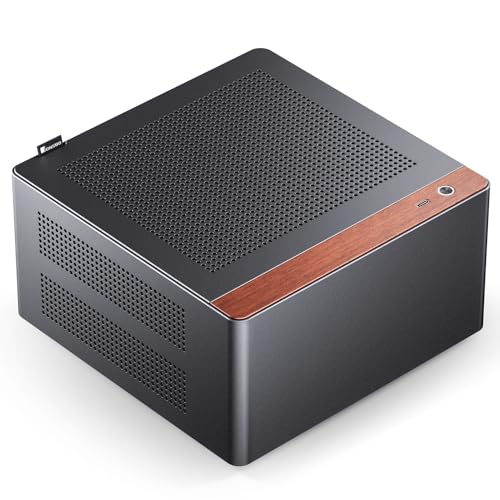
- JONSBO NV10 mini ITX PC Case, SFF Case -Flex Mini Volume Desktop case : With an aluminum alloy sandblasting process on the shell, delicate metal texture, and North American walnut trim.
- 【Standing Lying 】:Portable capacity of about 4.5L, which can be flexibly placed in both standing and lying positions. 【Size】:205mm(W) * 205mm(D) * 108mm(H) 【Standard with a PCI-E 4.0 Extended Cable】
- Material : Aluminum alloy , steel Tool Free Activation,The upper cover is equipped with an easy to pull handle, making disassembly and maintenance convenient

- Pre-installed 5 Fans: Includes 5 pre-installed 120mm reverse blade fans positioned at an perfect angle for superb cooling.
- Optimized Airflow: The 10° slanted bottom design not only enhances direct cold air intake but also significantly improves GPU cooling performance.
- Compact Design: The protruded mesh side panel is designed to accommodate full-sized ATX power supplies while maintaining a compact footprint. The pillar-less tempered glass front and side panels provide an unobstructed view of your internal components, showcasing your build with style.
The Ultimate Buying Guide: Your Mini-ITX PC Case Adventure
So, you’re thinking about building a small computer! Mini-ITX PC cases are awesome. They let you build powerful computers that don’t take up much space. Think of them as tiny houses for your computer parts. This guide will help you pick the perfect one.
Why Choose a Mini-ITX Case?
Mini-ITX cases are super small. They are great for saving space. You can put them on a desk, under a TV, or even mount them behind a monitor. They are also really quiet and use less power than bigger computers.
Key Features to Look For
When you shop for a Mini-ITX case, keep these things in mind:
Size and Dimensions
- Think about your space: How much room do you really have? Measure it!
- Check the volume: Cases are measured in liters. Smaller is usually better for saving space.
Cooling Capabilities
- Airflow is king: Good airflow keeps your computer parts cool.
- Fan mounts: How many fans can you fit? Where do they go?
- Radiator support: If you want advanced cooling, check if it fits a liquid cooler.
Component Compatibility
- CPU Cooler Height: Make sure your CPU cooler will fit inside. Big coolers won’t fit in small cases.
- GPU Length: If you want a powerful graphics card, check its length. Some small cases have limits.
- Power Supply Unit (PSU) Size: Most Mini-ITX cases use smaller SFX power supplies.
Storage Options
- Hard Drive Bays: How many hard drives or SSDs can you install?
- M.2 Slots: Many modern motherboards have M.2 slots for super-fast storage. The case doesn’t usually affect this.
Build Quality and Ease of Building
- Sturdy materials: A good case feels solid.
- Cable Management: Can you hide your wires neatly? This makes your PC look clean and improves airflow.
- Access: How easy is it to open and close the case?
Important Materials
Most Mini-ITX cases use a few key materials:
- Steel: This is strong and makes the case durable. It’s common for the frame and panels.
- Aluminum: This is lighter than steel. Some higher-end cases use aluminum for a premium feel and lighter weight.
- Tempered Glass: This is used for side panels. It lets you see inside your computer. It looks cool but can break if you’re not careful.
- Plastic: Sometimes used for accents or fan grilles.
Factors That Improve or Reduce Quality
Several things make a Mini-ITX case better or worse:
- Good airflow: This is a big one. Cases with well-placed vents and fan mounts keep your components from overheating.
- Solid construction: A case that doesn’t flex or bend feels much better.
- Thoughtful design: Features like good cable management make building easier and the PC look cleaner.
- Dust filters: These are small mesh screens that stop dust from getting inside. They are easy to clean and keep your PC running cooler.
- Poor airflow: If a case has no vents or the vents are blocked, your computer will get hot.
- Flimsy materials: A case that feels cheap and wobbly isn’t good.
- Lack of space for components: If you can’t fit your parts, the case is useless.
User Experience and Use Cases
Mini-ITX cases are great for many people:
- Gamers: You can build a small but powerful gaming PC. It fits easily on a desk.
- Home Theater PCs (HTPCs): These PCs are perfect for living rooms. They connect to your TV and play movies and music. They are quiet and blend in.
- Office PCs: If you need a computer for work but don’t have much desk space, a Mini-ITX is a smart choice.
- LAN Party Goers: Small PCs are easy to carry to friends’ houses for gaming.
Frequently Asked Questions (FAQ) about Mini-ITX PC Cases
Q: What is the smallest possible size for a Mini-ITX case?
A: The smallest Mini-ITX cases can be as small as 4 liters in volume. These are very compact!
Q: Can I put a regular ATX power supply in a Mini-ITX case?
A: Usually not. Most Mini-ITX cases need smaller SFX or SFX-L power supplies. Always check the case specifications.
Q: Will my big gaming graphics card fit in a Mini-ITX case?
A: It depends on the case. Many Mini-ITX cases have length limits for graphics cards. You need to check the case’s maximum GPU length.
Q: How do I make sure my CPU cooler fits?
A: Check the CPU cooler height clearance listed in the case’s specifications. Measure your cooler to be sure.
Q: Are Mini-ITX cases hard to build in?
A: Some very small cases can be a bit tricky. Cases with good cable management features make building much easier.
Q: Do I need special fans for a Mini-ITX case?
A: You can use standard case fans, but they need to be the right size for the mounting spots. Most cases use 120mm or 140mm fans.
Q: Can I install lots of storage drives in a Mini-ITX case?
A: Mini-ITX cases have limited space. Most can hold one or two 2.5-inch SSDs or a 3.5-inch hard drive. Some offer M.2 slots on the motherboard.
Q: Are Mini-ITX cases good for gaming?
A: Yes! You can build very powerful gaming PCs in Mini-ITX cases if you choose your components wisely and ensure good cooling.
Q: What does “volume in liters” mean for a PC case?
A: It’s the total internal space inside the case. A smaller liter number means a smaller case.
Q: Where can I find the dimensions and specs for a Mini-ITX case?
A: The product page on the retailer’s website or the manufacturer’s official website will have all the detailed specifications.

Hi, I’m Tom Scalisi, and welcome to The Saw Blog! I started this blog to share my hands-on experience and insights about woodworking tools—especially saws and saw blades. Over the years, I’ve had the chance to work with a wide range of tools, and I’m here to help both professionals and hobbyists make informed decisions when it comes to selecting and using their equipment. Whether you’re looking for in-depth reviews, tips, or just advice on how to get the best performance out of your tools, you’ll find it here. I’m excited to be part of your woodworking journey!