
Ever tried to get that perfect bass sound, only to end up with a muddy mess or a tinny twang? You’re not alone! Dialing in the right EQ settings for your bass guitar can feel like navigating a maze. So many knobs, so many frequencies – it’s easy to get lost and frustrated. You want your bass to rumble with power, cut through the mix with clarity, and groove with the rest of the band, but achieving that ideal balance often feels like a mystery.
This is where understanding bass EQ comes in. It’s the secret sauce to unlocking your instrument’s true potential. Forget the guesswork and the endless tweaking that leads nowhere. By the end of this post, you’ll have a clear roadmap to understanding the different parts of your EQ and how they affect your sound. We’ll break down the basics so you can stop guessing and start making confident choices.
Get ready to discover how to sculpt your bass tone like a pro. We’ll explore the key frequencies and how to adjust them for different styles and situations. Let’s dive in and make your bass sound amazing!
Top Bass Eq Settings Recommendations

- Volume B50K; Pickup MN250K
- Bass: +/- 10dB 30Hz B50K; Treble: +/- 10dB at 6KHz B50K
- P1 should be wired with neck pickup positive; P2 should be wired with bridge pickup positive; GND should be wired with two pickups negative
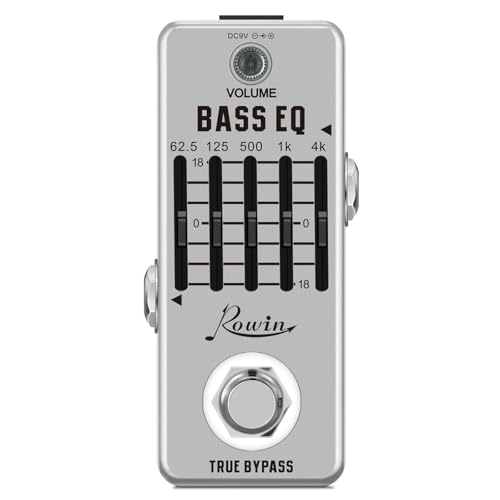
- 5-Band Surgical Precision: Shape your bass tone with +/-18dB control over 62.5Hz (sub-bass), 125Hz (warmth), 500Hz (presence), 1kHz (attack), and 4kHz (brightness)
- Slap-Ready Design: Enhance fingerstyle articulation with boosted midrange frequencies
- Tour-Grade Build: Aircraft-grade aluminum chassis survives 2m drop tests, LED indicator visible in direct sunlight

- 【Bass EQ 5-Band】5-Band Graphic EQ with master level control, Frequency Centers: 62.5Hz, 125Hz, 500Hz, 1kHz, 4kHz
- 【Master Level Slider】Controls the output level by ±18dB
- 【True Bypass】The true bypass design provides a transparent tone. During transmission, the signal remains fully intact, passing through the effects pedal with no popping, buzzing, or electric noise, let alone the loss of strength and frequencies

- 10-BAND GRAPHIC EQ — 31.25Hz TO 16kHz FOR GUITAR & BASS: The Band Controller delivers surgical tone-shaping power with ten precisely chosen frequency bands (31.25Hz, 62.5Hz, 125Hz, 250Hz, 500Hz, 1kHz, 2kHz, 4kHz, 8kHz, 16kHz)—covering everything from sub-bass rumble to sparkling treble air. Compatible with 4-string and 5-string bass, 6-string and 7-string guitar, and even synth rigs. Players describe the tone-sculpting power as "an absolute game changer" that can make a Les Paul sound like a Strat—or vice versa.
- INDEPENDENT VOLUME CONTROL & LED-BACKLIT SLIDERS: The dedicated master Volume slider on the right side lets you adjust overall output level independently from your EQ settings—perfect for matching your bypassed signal or adding a clean boost for solos. Each of the 10 frequency sliders features a green LED indicator that lights up when the pedal is engaged, making it easy to see your exact settings on dark stages. Pro tip: For the quietest performance and to eliminate hum, use a regulated, isolated 9V power supply (not included)—many noise issues reported by users are resolved with proper power.
- VERSATILE TONE SCULPTING — FROM SUBTLE TWEAKS TO COMPLETE TRANSFORMATION: Use the Band Controller in your amp's FX loop to augment the built-in tone stack, place it before your overdrive pedals to shape your gain structure, or position it last in your chain as a master tone shaper. Scoop the mids for modern metal, boost the low-end for a fatter clean tone, or tame harsh frequencies from bright pickups. The neutral detent position ensures flat response when all sliders are centered.

- For both bass and guitar, covering the common 4-string, 5-string bass and 6-string, 7-string guitars,Independent 10-band EQ that settings from 31.25Hz all the way up to 16kHz
- With independent output volume adjustment on the right side,Low power consumption current supply.All aluminum metal shell, durable and sturdy, lightweight and compact
- True Bypass.Deliver a transparent tone. During transmission, the signal remains fully intact, passing through the effects pedal with no popping, buzzing or electric noise

- Volume B50K;Pickup MN250K
- Bass: +/- 14dB 80Hz B100K; Middle: +/- 8dB 900Hz B100K; Treble: +/- 23dB 3-7KHz B100K
- P1 should be wired with neck pickup positive; P2 should be wired with bridge pickup positive; GND should be wired with two pickups negative

- Analog Preamp, Comp and Overdrive Effects for this bass pedal
- Classic optical compression sound, 3-band EQ with PRE/POST selection for enhancing and shaping your bass tone
- igh impedance input and XLR balanced output, 10M Ohms high-impedance input prevents tone loss; Do not connect XLR to phantom power

- TUNING - Four-band parametric EQ provides detailed control over key audio frequencies, allowing you to shape low, midrange, and high-frequency response for a more balanced, personalized in-car listening experience.
- PRECISION - Each parametric EQ band supports up to ±12 dB boost or cut, giving installers and enthusiasts the adjustment range needed to reduce unwanted peaks or bring forward frequencies that need more presence.
- OUTPUT - Master volume control delivers up to 9V RMS output, helping provide a strong preamp signal to compatible amplifiers while allowing convenient overall system-level adjustment from the equalizer.
Mastering Your Bass Sound: A Buyer’s Guide to EQ Settings
Getting your bass guitar to sound just right can be tricky. You want a deep rumble, a clear punch, or maybe a bit of both. EQ (equalization) settings are your secret weapon. This guide helps you understand what to look for and how to use EQ to make your bass sing.
Key Features to Look For in Bass EQ
When you’re thinking about EQ for your bass, focus on these important features:
Frequency Bands: The Building Blocks of Sound
- Low Frequencies (around 60-250 Hz): This is where the “boom” and warmth of your bass live. More of this makes your bass sound big and full. Too much can make it muddy.
- Mid Frequencies (around 250 Hz – 4 kHz): This range gives your bass its character and helps it cut through the mix. The low-mids (250-500 Hz) add body, while the upper-mids (1 kHz-4 kHz) bring clarity and definition, helping you hear individual notes.
- High Frequencies (above 4 kHz): This is where the “air” and “sparkle” of your bass are. It adds brightness and helps your bass stand out, especially if you play with a pick. Too much can sound harsh or tinny.
Controls: How You Shape Your Sound
- Bass Control: This usually affects the lowest frequencies. Turning it up adds boom; turning it down cleans things up.
- Mid Control: This is often a crucial knob. Some EQs have a “sweepable” mid, meaning you can choose exactly which mid-frequency to boost or cut. This is very powerful for fine-tuning.
- Treble Control: This knob affects the higher frequencies. More treble adds brightness; less makes it smoother.
- Presence/Bright Control: Some units have a separate control for the very highest frequencies, adding a bit more shimmer.
Important Materials and Build Quality
While EQ settings are about sound, the gear you use matters. Look for:
Solid Construction: Built to Last
Good EQ pedals or built-in EQ circuits on amps are usually made with sturdy metal casings. This protects the electronics inside and means they can handle being on the road or in your practice space.
Quality Components: For a Clearer Signal
The internal parts, like the potentiometers (knobs) and capacitors, affect how cleanly your sound is processed. Higher-quality components usually mean less unwanted noise and a more accurate sound.
Factors That Improve or Reduce Quality
What makes a bass EQ sound great or not so great?
Improving Quality:
- Specific Frequency Shaping: EQs that let you adjust very specific frequencies give you more control. This is like having a sharper pencil for drawing your sound.
- Low Noise Floor: A good EQ adds sound, not hiss. When you turn up the EQ, you want to hear your bass, not static.
- Intuitive Layout: Easy-to-understand knobs and clear labels make tweaking your sound much simpler.
Reducing Quality:
- Muddy Sound: If boosting the bass makes everything sound unclear and boomy, the EQ might be too broad in its low-end effect.
- Harshness: If boosting the treble makes your bass sound unpleasant or piercing, the high-frequency control might be too aggressive.
- Signal Loss: Some EQs can make your bass sound quieter or thinner when engaged. A good EQ should not degrade your signal.
User Experience and Use Cases
How do people actually use bass EQ?
For the Studio Musician:
In recording, EQ is used to make the bass fit perfectly with other instruments. You might cut some low-mid mud to make room for the guitar or boost the upper-mids so the bass can be heard clearly on smaller speakers.
For the Live Performer:
Live, EQ helps your bass cut through the band. You might boost the mids to be heard over loud drums or cut some boominess so your bass doesn’t overwhelm the vocals. Different rooms sound different, so EQ is key to adapting.
For the Bedroom Player:
Even at home, EQ is fun! You can experiment to find your favorite tones. Want a super deep, thumping sound for a hip-hop track? Boost the lows. Want a bright, articulate sound for a funk song? Boost the upper-mids and highs.
Frequently Asked Questions (FAQ) About Bass EQ Settings
Q: What are the most important EQ settings for beginners?
A: Start by understanding the low, mid, and high frequencies. Focus on making your bass sound clear and full without being too boomy or too thin.
Q: Should I boost or cut frequencies?
A: Both are important! Often, cutting problematic frequencies (like mud in the low-mids) can make your bass sound better than just boosting others.
Q: How do I make my bass sound “bigger”?
A: Gently boost the low frequencies (around 80-150 Hz). Be careful not to overdo it, or it will sound muddy.
Q: How do I make my bass cut through the mix?
A: Try a small boost in the upper-mid frequencies (around 1 kHz – 4 kHz). This is where the human ear hears clarity.
Q: What does “scooped mids” mean?
A: It means cutting the mid-frequencies. This can make the bass sound punchy with strong lows and highs, but it can also make it harder to hear in a full band.
Q: How much bass EQ is too much?
A: If your bass sounds unclear, boomy, or like it’s rattling, you probably have too much low-end boost. Listen for tightness and definition.
Q: Does EQ affect distortion or overdrive?
A: Yes! EQ before a distortion pedal shapes the sound that gets distorted. EQ after distortion shapes the final distorted tone.
Q: Should I set my amp EQ flat and use pedals?
A: Many players do this. A “flat” setting means the amp’s EQ isn’t adding or subtracting much. Then, pedals offer more specific tone shaping.
Q: How do I EQ for different basses (like a P-bass vs. a J-bass)?
A: Different basses have different inherent tones. A P-bass might need less low-mid boost than a J-bass to avoid muddiness.
Q: What’s a good starting EQ setting for playing rock music?
A: Try a slight boost in the lows for power, a small cut in the low-mids to stay clear, and a gentle boost in the upper-mids for definition.

Hi, I’m Tom Scalisi, and welcome to The Saw Blog! I started this blog to share my hands-on experience and insights about woodworking tools—especially saws and saw blades. Over the years, I’ve had the chance to work with a wide range of tools, and I’m here to help both professionals and hobbyists make informed decisions when it comes to selecting and using their equipment. Whether you’re looking for in-depth reviews, tips, or just advice on how to get the best performance out of your tools, you’ll find it here. I’m excited to be part of your woodworking journey!