
As an Amazon Associate I earn from qualifying purchases.
Choosing a Router For Spectrum 1 Gig can be confusing because your equipment must match both the service plan and your home’s Wi-Fi needs. A modem-router combo keeps setup simple, while a modem-only model gives you more freedom to choose a separate router or mesh system.
Look for DOCSIS 3.1 support, clear Spectrum compatibility, suitable Wi-Fi coverage, and enough Ethernet ports for wired devices. A 2.5 Gbps port can also give you more flexibility if you upgrade your network later.
These picks were selected from the provided products based on their stated Spectrum compatibility, speed support, Wi-Fi standards, coverage, and design. They cover different budgets and ownership preferences rather than repeating colour or size variants.
This guide compares five options, including high-capacity Wi-Fi 6 combos, compact all-in-one units, a lower-cost older Wi-Fi model, and a modem-only choice for custom networks.
Our Top 5 Router For Spectrum 1 Gig Picks at a Glance
| Product | ||
|---|---|---|
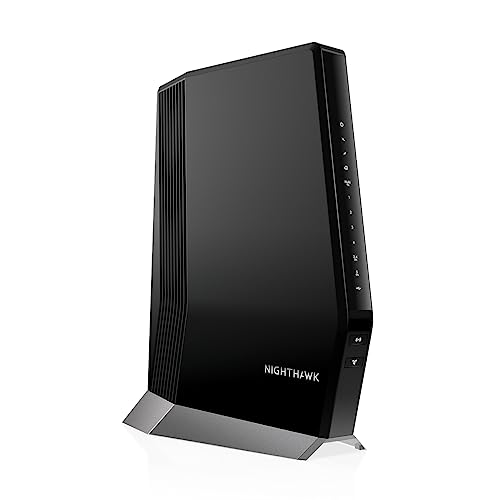 |
NETGEAR Nighthawk CAX80 Wi-Fi 6 Modem Router High-capacity whole-home Wi-Fi |
Check Price |
 |
ARRIS SURFboard G34 Wi-Fi 6 Modem Router Balanced coverage and value |
Check Price |
 |
NETGEAR Nighthawk CAX30 Wi-Fi 6 Modem Router Straightforward gigabit setup |
Check Price |
 |
ARRIS SBG8300 DOCSIS 3.1 Modem Router Lower-cost Wi-Fi 5 setup |
Check Price |
 |
NETGEAR Nighthawk CM3000 Cable Modem Custom router or mesh systems |
Check Price |
Top 5 Router For Spectrum 1 Gig: Detailed Reviews
1. NETGEAR Nighthawk CAX80 Wi-Fi 6 Modem Router
The NETGEAR Nighthawk CAX80 is a strong Router For Spectrum 1 Gig because it combines a DOCSIS 3.1 cable modem with AX6000 Wi-Fi 6. Spectrum plans up to 1Gbps are supported, while dual-band wireless covers up to 2,500 square feet and supports 30 or more connected devices. One 2.5 Gigabit port and four Gigabit Ethernet ports let you wire gaming consoles, desktops, and streaming devices. The Nighthawk app guides setup, runs speed tests, pauses devices, and creates guest networks.
What We Like:
- DOCSIS 3.1 supports gigabit-class cable internet and large downloads.
- AX6000 Wi-Fi 6 provides substantial capacity for busy households.
- Four Gigabit Ethernet ports make wired connections easy throughout your setup.
- The 2.5 Gigabit port gives compatible devices extra wired headroom.
- The Nighthawk app simplifies setup and everyday network management.
What Could Be Improved:
- Its real-world wireless coverage can vary with your home layout and construction.
- The 2.5 Gigabit port offers limited benefit if all your devices and service remain at 1Gbps.
- It is not compatible with providers such as Verizon, AT&T, CenturyLink, DirecTV, or DISH.
Buy the CAX80 if you want one capable device for Spectrum service, several wired connections, and a busy whole-home network. It suits households with many devices, gaming systems, and 4K streaming needs. Skip it if you prefer a separate modem and mesh system, need broader provider compatibility, or will not use its extra capacity.
2. ARRIS SURFboard G34 Wi-Fi 6 Modem Router
The Router For Spectrum 1 Gig is the ARRIS SURFboard G34, a modem-router combination with DOCSIS 3.1 and dual-band Wi-Fi 6. Its AX3000 wireless system covers up to 2,500 square feet, giving you a practical whole-home option for streaming, gaming, and everyday devices. DOCSIS 3.1 supports cable plans up to 2.5 Gbps, so it can handle service beyond one gigabit. Four Gigabit Ethernet ports support wired devices, while setup involves connecting the cable, powering on, and activating through your provider.
What We Like:
- Wi-Fi 6 coverage reaches up to 2,500 square feet.
- DOCSIS 3.1 supports cable plans up to 2.5 Gbps.
- Four Gigabit Ethernet ports accommodate multiple wired devices.
- The compact design takes up little space.
- Owning it can eliminate monthly modem rental charges.
What Could Be Improved:
- The four Ethernet ports are limited to 1 Gbps, so they cannot deliver a wired connection above gigabit speeds.
- You must confirm compatibility with your cable provider and plan before buying.
- A built-in router gives you less flexibility than a separate modem and mesh system.
Buy the G34 if you want one compact device for Spectrum service, whole-home Wi-Fi 6, and plans that may exceed one gigabit. It suits homes with several wired and wireless devices. Skip it if you need faster-than-gigabit wired networking or plan to build a dedicated mesh system.
3. NETGEAR Nighthawk CAX30 Wi-Fi 6 Modem Router
The NETGEAR Nighthawk CAX30 is a modem-router combo for cable internet, making it a practical Router For Spectrum 1 Gig if you want one device instead of separate hardware. DOCSIS 3.1 supports gigabit-plus cable plans, while dual-band AX2700 Wi-Fi 6 is rated for up to 2,000 square feet and 25 or more connected devices. Four Gigabit Ethernet ports give consoles, desktops, and streaming devices stable wired connections. The Nighthawk app provides guided setup, speed tests, device pausing, guest networks, and control over Wi-Fi names and passwords.
What We Like:
- Guided setup through the Nighthawk app keeps installation straightforward.
- Four Gigabit Ethernet ports suit homes with several wired devices.
- Wi-Fi 6 supports up to 25 or more connected devices.
- DOCSIS 3.1 is suitable for Spectrum plans up to 1Gbps.
- The built-in controls let you manage guest access and pause devices.
What Could Be Improved:
- The stated 2,000-square-foot coverage is not guaranteed because walls, layout, and home size affect real-world range.
- Its four wired ports are Gigabit Ethernet, so they do not provide multi-gig wired connections.
- It is limited to compatible cable providers and does not work with Verizon, AT&T, CenturyLink, DirecTV, DISH, or bundled services.
Buy the CAX30 if you want an uncomplicated cable setup for a Spectrum plan up to 1Gbps, with Wi-Fi 6, app-guided installation, and several wired connections. Skip it if your provider is unsupported, your home needs a mesh system, or you require multi-gig wired networking.
4. ARRIS SBG8300 DOCSIS 3.1 Modem Router
The ARRIS SBG8300-RB is a two-in-one cable modem and router for a Router For Spectrum 1 Gig setup, combining DOCSIS 3.1 with AC2350 Wi-Fi. Its gigabit-focused design provides a simpler alternative to newer Wi-Fi 6 models, while DOCSIS 3.1 is designed to improve speed, security, and gaming latency compared with DOCSIS 3.0. You can use it with Spectrum, Cox, Xfinity, and other approved US cable providers. It does not work with fiber, DSL, satellite, or cable digital voice service, so check your plan first.
What We Like:
- The modem-router combination keeps your setup simpler by putting both core devices in one unit.
- DOCSIS 3.1 suits gigabit-focused cable plans and offers newer technology than DOCSIS 3.0.
- AC2350 Wi-Fi provides a straightforward Wi-Fi 5 option for compatible home devices.
- Buying the modem can reduce rental costs, with savings of up to $168 per year depending on your provider.
- It is approved for Spectrum, Cox, Xfinity, and other US cable internet providers.
What Could Be Improved:
- Wi-Fi 5 is older than the Wi-Fi 6 standard used by newer modem-router options.
- It does not support cable digital voice service.
- It is unsuitable for fiber, DSL, satellite, and other non-cable internet services.
Buy it if you have Spectrum or another approved cable provider, want a single modem-router unit, and prefer a simpler gigabit setup over newer Wi-Fi 6 features. Skip it if you need fiber compatibility, cable voice service, or a more current wireless standard for newer devices.
5. NETGEAR Nighthawk CM3000 Cable Modem
The NETGEAR Nighthawk CM3000 is a modem-only cable unit for building your own home network. If you need a Router For Spectrum 1 Gig, it gives you flexibility to choose a separate Wi-Fi router or mesh system and replace it later without changing the modem. DOCSIS 3.1 supports internet plans up to 2.5 Gbps download and 1 Gbps upload, while the 2.5 Gig Ethernet port connects to a compatible router for multi-gig service. The Nighthawk app guides setup, checks status, runs speed tests, and manages firmware updates.
What We Like:
- The 2.5 Gig Ethernet port supports faster-than-gigabit service with a compatible router and plan.
- Two additional 1 Gig ports can combine for speeds up to 2 Gbps with compatible equipment.
- DOCSIS 3.1 supports Spectrum and other cable providers with plans up to 2 Gbps.
- The Nighthawk app provides guided setup and remote modem management.
- Active Queue Management helps limit slowdowns during peak-hour congestion.
What Could Be Improved:
- It has no built-in Wi-Fi, so you must buy a separate router or mesh system.
- Getting multi-gig performance requires compatible networking equipment and an eligible internet plan.
- It may cost more overall than a modem-router combo once you add whole-home Wi-Fi equipment.
Buy the CM3000 if you want a flexible foundation for a custom router or mesh network, especially if you may move beyond gigabit service. Skip it if you want one box with built-in Wi-Fi or prefer a simpler Spectrum setup without separate networking hardware.
How To Choose A Router For Spectrum 1 Gig
Choosing a Router For Spectrum 1 Gig service starts with deciding whether you want one device or separate networking equipment. A modem router combines the modem and Wi-Fi hardware, while a standalone cable modem lets you choose a separate router or mesh system. Your preferred setup affects convenience, flexibility, and how easily you can change the network later.
Check the modem and Wi-Fi combination
For a simple installation, a modem router keeps the equipment count down and gives you one device to manage. This can suit an apartment, smaller home, or anyone who does not want to configure separate components. If you want more control over wireless coverage, a standalone modem paired with a custom router or mesh system gives you another path.
Choose the right Wi-Fi generation
Wi-Fi 6 is the newer wireless standard represented by several options in this list, while Wi-Fi 5 remains available in the lower-cost setup. Wi-Fi 6 makes more sense if you have newer phones, laptops, TVs, or other devices and want a more current foundation for whole-home Wi-Fi. Wi-Fi 5 can still be a reasonable choice if keeping the setup simple and affordable matters more than having the latest standard.
Think about whole-home coverage
Your home layout and wireless demands should guide the decision. A single modem router may be enough for straightforward coverage, but larger or more demanding homes may benefit from a separate mesh system. Do not choose based on the gigabit plan alone; consider how many devices connect, where you use them, and whether you expect your network needs to grow.
Balance convenience with upgrade options
All-in-one equipment is easier to set up and manage, but replacing the entire unit may be necessary if you later want a different router. A standalone modem separates those jobs, so you can change the router or mesh system without replacing the modem. Decide whether you value a cleaner setup now or greater flexibility over time, then match that priority to the equipment type.
Which Router For Spectrum 1 Gig Should You Choose?
The NETGEAR Nighthawk CAX80 is the best overall pick for a high-capacity whole-home Wi-Fi setup, pairing a Wi-Fi 6 modem router with a focus on broader household use. The ARRIS SURFboard G34 is the best alternative if you want balanced coverage and value. Choose the CAX30 for a straightforward gigabit setup, the SBG8300 for a lower-cost Wi-Fi 5 option, or the CM3000 if you prefer a custom router or mesh system.

Hi, I’m Tom Scalisi, and welcome to The Saw Blog! I started this blog to share my hands-on experience and insights about woodworking tools—especially saws and saw blades. Over the years, I’ve had the chance to work with a wide range of tools, and I’m here to help both professionals and hobbyists make informed decisions when it comes to selecting and using their equipment. Whether you’re looking for in-depth reviews, tips, or just advice on how to get the best performance out of your tools, you’ll find it here. I’m excited to be part of your woodworking journey!