
Have you ever wondered why some YouTube videos look super clear, like you could reach out and touch them, while others seem a little fuzzy? It’s not magic, it’s all about video resolution! Choosing the right resolution for your own YouTube videos can feel like navigating a maze. You see terms like 1080p, 4K, and even 8K, and it’s easy to get confused. Which one makes your video look its best without taking up too much space?
Picking the wrong resolution can lead to a few problems. Maybe your video looks grainy on bigger screens, or perhaps it takes forever to upload because the file is too big. You want your viewers to have the best experience possible, and that starts with a crisp, clear picture. This confusion can stop you from sharing your amazing content with the world.
But don’t worry! By the end of this post, you’ll understand exactly what those resolution numbers mean. We’ll break down the pros and cons of each so you can confidently pick the perfect setting for your videos. Get ready to make your YouTube content shine!
Top Resolution For Youtube Videos Recommendations

- 4K & 64MP Video Camera Camcorder: Capture life in breathtaking detail with 4K Ultra HD recording and vibrant 64MP photos, powered by an advanced high-sensitivity CMOS sensor. Equipped for exploring the beautiful world, this video camera is your perfect companion! Ideal for video recording, travel vlogs, family activities, interviews, studying, and cherishing precious moments
- 18X Digital Zoom & Infrared Night Vision: This 4K camcorder powerful 18x digital zoom brings distant action right to you. Capture clear details of people and landscapes. With the push of “OK” button, activate the IR cut filter. This night vision camcorder delivers high-contrast black & white video in total darkness, providing a clearer image than standard low-light color mode
- 3.0 Inches Touchscreen with 270° Rotation: This camcorder features a brilliant 3-inch touchscreen that puts complete control in your hands. The screen rotates a full 270 degrees, making it a game-changer for vloggers. Easily frame yourself for solo shots, capture high-angle overhead videos, or get creative low-angle perspectives

- 🎥 【4K Digital Camera for Vlogging-Made for Beginners & First-Time Content Creators】Shoot stunning 4K video and capture 75MP photos for clear, shareable content. Create eye-catching videos without complicated settings. This easy-to-use camera is perfect for YouTube, TikTok, travel vlogs, and daily recording. Fast autofocus and a wide-angle lens ensure sharp and stable footage
- 🌍【 Portable Pocket Camera for Travel & Daily Use】Compact and lightweight, this portable camera easily fits in your pocket—perfect for travel, vacations, outdoor trips, hiking, and everyday life recording. Capture high-quality moments anytime, anywhere
- 🎬【Perfect for Solo Vlogging】Film yourself with confidence using the unique 330° rotating lens. Create travel vlogs, daily videos and outdoor content with natural-looking framing and less camera adjustment. Also supports time-lapse, slow motion and interval shooting for more creative storytelling.

- 【5K Camcorder Video Camera】 This digital video camera captures stunning 5K/20fps videos (also 4K/60fps) and 64MP photos with a high-sensitivity CMOS sensor. Perfect for vlogging, travel films, podcast recording, family events, and interviews, delivering cinema-grade detail even in motion.
- 【270° Pro Flip Screen & Durability】 The video cameras for filming features a durable metal-hinge and 3.0" 270° rotatable IPS touch screen for flexible selfies, low-angle shots, and group filming.
- 【Ultimate Creator Bundle Included】 Start shooting immediately for the vlogging camera: 32GB Memory Card, dual 1800mAh batteries, tripod, external mic (noise reduction), remote control, lens hood, and more. This complete podcast equipment bundle is perfect for YouTube beginners and content creator camera users, from vloggers to pros — an ideal streaming camera setup for live broadcasts and recording.

- 【4K60 Loop-Out & 1080P60/2K30 Capture】 This HDMI game capture card supports 4K 60Hz HDMI input and loop-out, captures up to 1080P 60fps video, and outputs up to 2K 30Hz via USB 3.0 with YUY2. HDMI input supports 4K30/60Hz and 1080p120/144Hz; it does not support 4K120/144Hz. Ideal for PS4/PS3, Xbox One/360, Wii U, Switch 2, DVD, DSLR, camera, security camera, set-top box, live games, online meetings, real-time recording, and preview.
- 【Plug-and-Play, Stable & Ultra-Low Latency】 No driver or external power supply required—true plug and play. The device is automatically identified, detects input, and adjusts output automatically. Aluminum alloy body with strong heat dissipation and optimized cable layout improves stability and picture clarity, helping avoid blue screens and lag. USB 3.0 low-latency capture with optional audio capture; no CPU occupation and no freeze with correct settings.
- 【HDMI Loop-Out & Mic-In】 High-speed USB 3.0 single-channel HD HDMI capture with loop-out for lag-free live gameplay. The 3.5mm mic input lets you add external commentary during games or interviews; it only accepts a 3.5mm microphone headset. Note: it does not record party chats.

- 【2026 Latest 8K ULTRA HD & 88MP Video Camera】This video camera records videos up to 8k resolution at 15FPS, and captures 88MP High-resolution Image with advanced 6-axis gyroscope autofocus. The 8K video camera definitely producing sharp, clear images and smooth, stable video recording. Built-in 3 inch touch screen youtube camera supports 270°rotation and 18X digital zoom, which allows you to capture and records with precision.
- 【8K Wifi Camcorder & IR Night Vision】Our 8K video cameras supports WiFi fast transmission, download "iSmart DV2" APP, then simply connected your camcorder with Android /IOS smartphone and tablets. Then you can fast view, browse, share, transfer images and videos via mobile devices without any annoyed cable, you can also remote control the camera by App. Just press ''OK'' button, this YouTube camera with IR night vision, you can capture black and white photos or videos in dimly lit or dark environments.
- 【Webcam Function & External Microphone】8K Vlogging camera supports used for live streaming and video calling. Just simply connected our 8k camcorder with computer through the usb cable comes with package and choose ‘‘PC Camera’’ to enter webcam mode, and choose ‘‘General UVC Camera’’ on external camera of social media software. The external microphone reduce wind noise and eliminate background noise effectively.

- 【QHD 2.7K Video Camera】 This camcorder supports 2.7K video recording, up to 50MP photo resolution, and 16X digital zoom. The built-in LED fill light enhances your shoots in low-light and nighttime conditions. Suitable for various scenarios like sports events, family gatherings, football games, travel, weddings, YouTube videos, live streaming, and hiking, it lets you capture every exciting moment.
- 【Webcam Functionality】When connected to a computer, this video camera can function as a webcam. Perfect for live streaming, video calls with family and friends, or recording meetings and classes, it ensures a clear and high-quality connection. Capture stunning photos or videos and share them on YouTube with this vlogging camera.
- 【Long-duration & Recording While Charging】The QHD vlogging camera includes two high-capacity 1500mAh NP-40 lithium batteries, each providing over 140 minutes of continuous recording. It also supports recording while charging, ensuring you won't miss any important moments due to low battery, making it perfect for events like concerts, sports games, and vlogging.

- UHD 6K 64MP & 30FPS Camcorder & 18X Digital Zoom: This video camera supports HD 6K (5760x3240p)/30FPS and 4K(3840X2160p) /60FPS video recording, 64MP photo capture, and powerful 18X digital zoom, presenting clearer and more detailed images, allowing you to record every precious moment seamlessly
- 4.0-Inch Touch Screen & WIFI Function: This 6K camcorder comes with a 4.0-inch Ultra HD touch screen and supports WIFI connectivity. Simply download the Hello Cam app on your smartphone or tablet to connect to the camera's WIFI-you can then browse albums, download files for sharing, and even control the camcorder remotely via the app
- 2.4G Remote Control & IR Night Vision: This camcorder is equipped with a 2.4G remote control, the remote control can be 20 meters away. It can remotely control the camera from a 360 degree angle. And also with the night vision function, you can capture clear and bright images even in low-light environments, day or night, to ensure that you capture every wonderful moment vividly
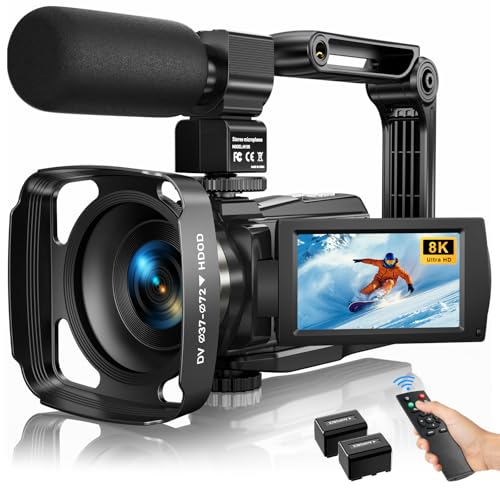
- Latest 8K Video Camera with Remote Control : This Video camera features 8K video resolution at 15FPS, with additional options for 6K at 30FPS, 5K at 30FPS, 4K at 30FPS, 1080P at 60FPS/30FPS, 720P at 60FPS/30FPS. With an impressive 88MP image resolution and 18X digital zoom, this camcorder delivers exceptional visuals. The included remote control allows for effortless self-recording and photography from any angle, making it an ideal 8K vlogging camera for bloggers and content creators.
- Experience Smooth and Stable Footage with Our 8K Camcorder : Featuring advanced 6-Axis anti-shake technology for high-precision stabilization. The 3-inch, 270-degree rotatable touch screen allows for effortless self-recording and framing, making it perfect for vlogging and self-blogging. Additionally, the digital video camera's intuitive interface and user-friendly navigation ensure easy operation, so you can focus on capturing stunning 8K video and photos.
- Infrared Night Vision Video Camera with WiFi : Stay connected and share your moments instantly with our 8K Camera's built-in Wi-Fi and companion app "iSmart DV2". Download the app on your Android/iOS device to easily transfer photos/videos, and share them directly to social media platforms like Facebook and YouTube. Additionally, this camera features infrared night vision, allowing you to capture footage in low-light environments, producing clear black and white images even in complete darkness.
The Ultimate Buying Guide: YouTube Video Resolution Explained
Choosing the right resolution for your YouTube videos is super important. It makes your videos look great and keeps viewers watching. This guide helps you pick the best resolution for your needs.
What is Video Resolution?
Video resolution tells you how many pixels are in a video. Pixels are tiny dots that make up the picture. More pixels mean a sharper, clearer image. Think of it like drawing with more crayons – you can make a more detailed picture.
Key Features to Look For
When you’re looking at video resolution options, keep these features in mind:
1. Pixel Dimensions
This is the most important feature. It tells you the width and height of the video in pixels. Common resolutions include:
- 720p (HD): 1280 pixels wide by 720 pixels tall. This is High Definition and looks good on most screens.
- 1080p (Full HD): 1920 pixels wide by 1080 pixels tall. This is Full High Definition and is the most popular choice for YouTube. It looks really crisp and clear.
- 1440p (2K): 2560 pixels wide by 1440 pixels tall. This offers even more detail than 1080p.
- 2160p (4K/UHD): 3840 pixels wide by 2160 pixels tall. This is Ultra High Definition and has amazing detail. It’s the highest quality you can get right now.
2. Aspect Ratio
This is the shape of your video. Most YouTube videos use a 16:9 aspect ratio. This means the video is 16 units wide for every 9 units tall. It’s the standard widescreen format.
3. Frame Rate
This is how many frames (pictures) show up every second. Higher frame rates (like 60fps) make fast-moving action look smoother. Standard is usually 24fps or 30fps.
Important Materials (What Matters for Quality)
While you don’t buy “materials” for resolution itself, the quality of your camera and editing software are crucial.
- Camera: A camera that can record in higher resolutions (like 1080p or 4K) is essential. If your camera only records in 720p, you can’t make a 1080p video.
- Editing Software: Your video editing program needs to support the resolution you want to export. Most modern software does.
Factors That Improve or Reduce Quality
Many things can affect how good your video resolution looks.
Factors That Improve Quality:
- Higher Resolution Recording: Always film in the highest resolution your camera allows.
- Good Lighting: Bright, even lighting helps the camera capture more detail.
- Stable Footage: Shaky video looks worse, especially at higher resolutions. Use a tripod or stabilizer.
- Clear Audio: Good sound makes the whole video experience better.
- High Bitrate: Bitrate is how much data is used to show your video. A higher bitrate means more detail. YouTube recommends specific bitrates for different resolutions.
Factors That Reduce Quality:
- Lower Resolution Recording: Filming in a low resolution limits the final quality.
- Poor Lighting: Dark or grainy footage is hard to watch.
- Lots of Compression: When videos are made smaller in file size, they can lose quality. YouTube does compress videos, but starting with a good source helps.
- Digital Zoom: Using zoom on your phone or camera digitally can make the picture blurry.
User Experience and Use Cases
Who is this for and how will they use it?
User Experience:
- Viewers: They want to see clear, sharp videos. Higher resolutions mean a better viewing experience. They can also zoom in on details without losing too much quality.
- Creators: You want your videos to look professional. Choosing the right resolution helps you achieve this. It also gives you more flexibility when editing.
Use Cases:
- Everyday Vlogs and Tutorials: 1080p is perfect. It looks great on phones, tablets, and computers.
- Cinematic Videos or Nature Documentaries: 1440p or 4K can showcase stunning details and landscapes.
- Gaming Videos: 1080p at 60fps is ideal for smooth gameplay. 1440p or 4K can capture intricate game graphics.
- Product Reviews: High resolution helps viewers see small details of the product clearly.
Frequently Asked Questions (FAQ)
Q: What is the best resolution for YouTube videos?
A: 1080p (Full HD) is the most popular and a great choice for most videos. 4K (2160p) offers the highest quality if your audience has good internet and screens.
Q: Do I need a special camera for 4K videos?
A: Yes, you need a camera that can record in 4K resolution. Many newer smartphones and dedicated cameras can do this.
Q: Will 4K videos take up more space on my computer?
A: Yes, 4K video files are much larger than 1080p files. You will need more storage space.
Q: Does YouTube compress my videos?
A: Yes, YouTube compresses all videos to make them stream efficiently. However, starting with a high-quality video helps the final result.
Q: How does resolution affect upload time?
A: Higher resolution videos have larger file sizes. This means they will take longer to upload.
Q: Can I upload a 1080p video if my camera only recorded in 720p?
A: No, you cannot magically create more detail. If you film in 720p, the highest resolution you can export is 720p.
Q: What is the difference between 1080p and 1440p?
A: 1440p has more pixels (more detail) than 1080p. It looks sharper, especially on larger screens.
Q: Is 720p good enough for YouTube?
A: 720p (HD) is decent, but 1080p (Full HD) looks much better and is recommended for most creators.
Q: Should I record in 60fps?
A: Record in 60fps if you have fast-moving action, like in gaming videos or sports. For talking head videos or slower content, 30fps is usually fine.
Q: How can I make my videos look sharper at any resolution?
A: Use good lighting, keep your camera steady, focus properly, and avoid digital zoom. Also, ensure your editing software settings are correct.

Hi, I’m Tom Scalisi, and welcome to The Saw Blog! I started this blog to share my hands-on experience and insights about woodworking tools—especially saws and saw blades. Over the years, I’ve had the chance to work with a wide range of tools, and I’m here to help both professionals and hobbyists make informed decisions when it comes to selecting and using their equipment. Whether you’re looking for in-depth reviews, tips, or just advice on how to get the best performance out of your tools, you’ll find it here. I’m excited to be part of your woodworking journey!