
As an Amazon Associate I earn from qualifying purchases.
Choosing a Podcasting Mic can be difficult when you need clear speech without building a full studio. The right model depends on your room, connection preferences, monitoring needs, and whether you record alone or with a guest.
USB microphones keep setup simple, while USB/XLR models let you move to an audio interface later. Dynamic designs can suit voice-focused recording, and features such as cardioid pickup, noise reduction, mute controls, and headphone monitoring can make sessions easier to manage.
These picks were selected from the listed features, with attention to connection options, recording control, included accessories, and different types of podcasting setups. The list includes straightforward desktop microphones, upgradeable models, a professional XLR option, and a wireless choice.
Below, you will find the strengths and trade-offs of each microphone, followed by a practical buying guide to help you match one to your recording style.
Our Top 7 Podcasting Mic Picks at a Glance
| Product | ||
|---|---|---|
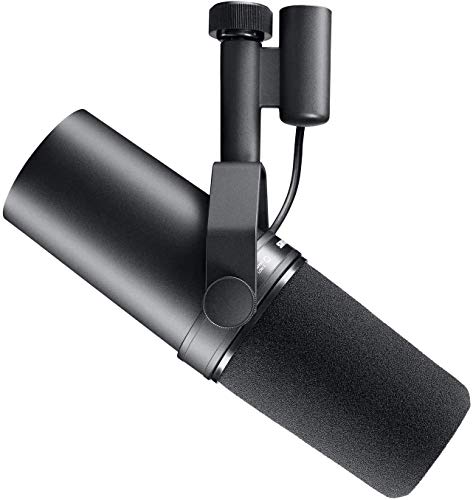 |
Shure SM7B Dynamic Vocal Microphone Professional XLR podcasting |
Check Price |
 |
MAONO PD200W Hybrid Wireless Podcast Mic Wireless desktop recording |
Check Price |
 |
Logitech G Blue Yeti USB Microphone Flexible multi-person recording |
Check Price |
 |
FIFINE AmpliGame AM8 USB/XLR Mic Streaming and podcast upgrades |
Check Price |
 |
FIFINE AmpliTank K688CT Podcast Mic Kit Boom-arm desktop setups |
Check Price |
 |
ZealSound K66 USB Podcast Microphone Simple noise-controlled recording |
Check Price |
 |
TONOR TC-777 USB Podcast Microphone Straightforward starter recording |
Check Price |
Top 7 Podcasting Mic: Detailed Reviews
1. Shure SM7B Dynamic Vocal Microphone
The Shure SM7B is a professional Podcasting Mic built for broadcast-style vocals and close-mic recording. Its dynamic cartridge and wide-range frequency response produce warm, balanced speech, while the cardioid pickup pattern, air suspension shock isolation, and electromagnetic shielding help keep your voice focused and reduce room interference, vibration, and hum. Built-in pop filtering and the detachable windscreen reduce plosives, breath, and wind noise. Its XLR output gives you control through an audio interface or mixer, but it is not a direct USB microphone.
What We Like:
- Natural, balanced vocal sound suits podcasts, broadcasts, and streaming.
- Cardioid pickup keeps attention on your voice and helps limit room interference.
- Built-in pop filtering and the detachable windscreen reduce plosives and breath noise.
- Rugged all-metal construction is designed for consistent, reliable use.
- XLR connectivity gives you control over gain, EQ, and tone shaping.
What Could Be Improved:
- You need an audio interface or mixer because it has an XLR output rather than USB connectivity.
- Its professional setup is less convenient than a plug-and-play desktop microphone.
Buy it if you want broadcast-focused vocal recording and already use, or plan to add, an audio interface or mixer. It suits podcasters, streamers, musicians, and engineers who value control and focused sound. Skip it if you want simple USB recording with minimal equipment or setup.
2. MAONO PD200W Hybrid Wireless Podcast Mic
This Podcasting Mic gives you three connection options: wireless for cable-free desktop recording, USB for plug-and-play use with a phone, tablet, or computer, and XLR for a more traditional setup. Its 30mm dynamic capsule and cardioid pickup focus on vocals, while three-stage noise cancellation helps reduce unwanted sound in less-than-perfect rooms. One receiver can connect two wireless microphones and record each to its own track, which suits interviews and co-hosted shows. You also get MaonoLink presets, a 60m wireless range, and up to 60 hours of battery life with RGB disabled.
What We Like:
- Wireless operation keeps your desktop clear and gives you more recording freedom.
- USB makes setup simple across phones, tablets, and computers.
- XLR support lets you use the mic in a more traditional audio setup.
- One receiver supports two wireless microphones with separate tracks for easier editing.
- The long battery life and 60m range suit flexible recording locations.
What Could Be Improved:
- Wireless recording depends on keeping the microphone charged, especially for regular sessions.
- The most useful sound controls and presets require the MaonoLink app on a PC or smartphone.
- Using two wireless microphones means managing both units through a single receiver rather than completely separate systems.
Buy it if you want one microphone that can handle wireless desktop recording, simple USB sessions, and future XLR use, particularly for interviews with two speakers. Skip it if you only need a basic wired USB mic or prefer a setup with no battery, receiver, or companion app to manage.
3. Logitech G Blue Yeti USB Microphone
The Logitech G Blue Yeti is a versatile Podcasting Mic for PC and Mac, using a three-capsule array to produce clear sound for voices, instruments, streaming, and meetings. Its four pickup patterns—cardioid, omni, bidirectional, and stereo—let you handle solo shows, interviews, group recording, or stereo sources with one microphone. Onboard gain, headphone volume, mute, and pattern controls make adjustments quick, while the adjustable desktop stand and zero-latency monitoring help you position and monitor your voice. Plug-and-play USB setup keeps recording simple.
What We Like:
- Four pickup patterns cover solo, interview, group, and stereo recording.
- Onboard controls let you adjust gain, monitoring volume, pickup pattern, and mute quickly.
- The included adjustable stand supports easy desktop positioning.
- Zero-latency headphone monitoring helps you hear your voice in real time.
- Blue VO!CE software adds vocal effects, modulation, and HD audio samples.
What Could Be Improved:
- Its USB design is convenient, but it does not offer the flexibility of an XLR connection for broader audio-system upgrades.
- The large range of pickup patterns and controls may feel excessive if you only record a single speaker.
- Desktop positioning may not suit you if you prefer a boom arm, although the mic can connect to one.
Buy it if you want one USB microphone that can adapt to solo podcasts, interviews, group sessions, streaming, and stereo recording without complicated setup. Skip it if you need an XLR-first workflow, a compact microphone, or only want simple single-speaker recording without extra patterns and controls.
4. FIFINE AmpliGame AM8 USB/XLR Mic
The FIFINE AmpliGame AM8 is a Podcasting Mic that gives you simple USB recording now and an XLR upgrade path later. Its cardioid dynamic design and 50Hz–16KHz frequency response are intended for balanced voice capture, while the headphone jack lets you monitor your sound. A physical mute button helps stop unwanted audio quickly, and controllable RGB lighting adds three modes and more than 10 colors for a desktop setup. Use USB for straightforward computer recording, or connect an audio interface or mixer through XLR when your setup grows.
What We Like:
- USB operation keeps setup simple for beginner creators.
- XLR support lets you move to an interface or mixer later.
- The headphone jack provides real-time monitoring.
- The mute button gives you quick control during recording or streams.
- Controllable RGB lighting adds visual customization for gaming desks.
What Could Be Improved:
- XLR use requires a separate cable, audio interface, or mixer.
- The RGB lighting and extra controls may be unnecessary if you want a minimal recording setup.
- You need to choose between USB simplicity and the more involved XLR setup as your needs change.
Buy the FIFINE AmpliGame AM8 if you want an easy USB starting point with room to build a more advanced XLR setup later. It suits podcasters, streamers, and home creators who value monitoring, mute control, and desktop lighting. Skip it if you want a completely stripped-down microphone with no upgrade features.
5. FIFINE AmpliTank K688CT Podcast Mic Kit
The FIFINE AmpliTank K688CT is a Podcasting Mic kit for desktop recording, streaming, and podcasting. Its dynamic microphone offers natural sound reproduction and handles sound levels up to 120dB. You get both USB and XLR connectivity, so you can start from a computer and later use an XLR mixer. The included metal boom arm keeps the mic positioned, while the shock mount and windscreen help reduce handling noise, plosives, and low-frequency vibration. Tap-to-mute control and monitoring make USB sessions easier to manage, though the clamp fits desks under 2 inches thick.
What We Like:
- USB and XLR connections support simple recording now and future equipment upgrades.
- The metal boom arm keeps the microphone supported and positioned above your desk.
- Tap-to-mute control lets you silence the mic quickly during a session.
- The shock mount and windscreen help control vibration, plosives, and harsh noise.
- Monitoring gives you a more direct way to manage your recording session.
What Could Be Improved:
- The C-clamp only fits desks under 2 inches thick, limiting placement options.
- The microphone’s function keys do not work over XLR, so USB provides the fullest control set.
- A boom-arm setup takes more desk space than a basic stand-mounted microphone.
Buy it if you want a complete desktop setup with a metal boom arm, USB convenience, XLR flexibility, monitoring, and quick muting. It suits podcasters and streamers planning to improve their equipment over time. Skip it if your desk is too thick for the clamp or you want a compact, minimal setup.
6. ZealSound K66 USB Podcast Microphone
The ZealSound K66 Podcasting Mic is a plug-and-play USB condenser microphone for straightforward voice recording at home. Its cardioid pickup pattern focuses on sound in front of the mic, while Noise Reduction Mode is designed to make recordings clearer in everyday environments. Dedicated controls let you adjust microphone gain, monitoring volume, and echo without software, and the 3.5mm headphone jack provides zero-latency monitoring. A one-press mute button with an LED indicator helps you cut audio quickly during podcasts, calls, or streams.
What We Like:
- Driver-free USB setup keeps recording simple.
- Noise Reduction Mode helps focus voice audio in real-world spaces.
- Separate gain, volume, and echo controls provide useful hands-on adjustment.
- Zero-latency headphone monitoring lets you hear your recording immediately.
- The illuminated mute button makes quick muting easy to confirm.
What Could Be Improved:
- USB operation limits it to setups that do not need an XLR connection.
- The echo control may be unnecessary if you prefer to shape all sound during editing.
- As a condenser microphone, it may require more attention to room noise than a dynamic model.
Buy the K66 if you want an uncomplicated USB microphone with built-in noise reduction, direct controls, headphone monitoring, and quick mute access. It suits podcasts, YouTube, meetings, and casual streaming. Skip it if you need XLR connectivity, wireless use, or a setup built around extensive hardware expansion.
7. TONOR TC-777 USB Podcast Microphone
The TONOR TC-777 is a compact Podcasting Mic for straightforward home recording, streaming, calls, and voice work. Its USB 2.0 plug-and-play connection works with Windows, Mac, PS4, and PS5, while compatibility with Zoom, Skype, and Discord helps you start without drivers or assembly. The cardioid condenser pickup focuses on your voice in front of the mic and suppresses unwanted background noise. A foldable tripod, mini shock mount, adjustable pop filter, one-click mute, and volume control give you practical desktop control in a small footprint.
What We Like:
- Plug-and-play USB setup gets you recording without additional drivers.
- Cardioid pickup helps reduce unwanted sound from behind the microphone.
- The foldable tripod takes up little desktop space and adds stability.
- One-click mute and volume control make quick adjustments simple.
- The adjustable pop filter and shock mount support cleaner spoken-word recording.
What Could Be Improved:
- It uses a USB connection, so it is less suitable if you need an XLR-based setup.
- The compact tripod is designed for desktop use rather than flexible boom-arm positioning.
- Cardioid pickup reduces background noise but does not eliminate room sound entirely.
Buy the TC-777 if you want an uncomplicated desktop microphone for podcasting, streaming, calls, or casual voice recording across common devices. Its included accessories make it easy to begin. Skip it if you need XLR connectivity, boom-arm flexibility, or a setup designed for more advanced audio hardware.
How to Choose a Podcasting Mic
A good Podcasting Mic should match your room, recording style, and equipment rather than simply offer the longest feature list. Start by deciding how you will connect it, how many people you need to record, and whether you want a permanent desktop setup or something you can move between locations.
Choose the right Podcasting Mic connection
USB microphones connect directly to a computer and usually suit straightforward home recording. XLR models work with compatible audio equipment and can fit more expandable setups, but they require extra hardware and a little more configuration. Hybrid USB/XLR microphones give you a choice, which can be useful if you expect your recording workflow to change.
Match the microphone to your recording setup
Consider whether you record alone, host guests, or need a microphone for streaming as well as podcasts. A desktop design keeps the setup simple, while a boom-arm arrangement can free space and make positioning easier. Wireless operation adds flexibility for desktop recording, but you should confirm that the connection method suits your computer and intended workspace.
Think about room noise and placement
Your room affects clarity as much as the microphone. If you record near a keyboard, a busy living space, or other sound sources, look for a setup designed around noise control and place it close enough for a consistent voice level. A microphone that sounds good only when positioned perfectly may demand more adjustment than you want to make for every session.
Check what the complete setup includes
Look beyond the microphone itself. A kit may include useful mounting equipment, while a separate desktop stand or boom arm could be necessary for comfortable placement. Also consider controls that help you manage recording without reaching for software, the number of cables involved, and whether the microphone can grow with your needs. The simplest choice is often the one you can set up quickly and use consistently.
Which Podcasting Mic Fits Your Setup?
The Shure SM7B Dynamic Vocal Microphone is the best overall pick here if you want professional XLR podcasting and are prepared for a more involved setup. The MAONO PD200W Hybrid Wireless Podcast Mic is the best alternative for flexible wireless desktop recording. Choose the Shure for a traditional, expandable podcast workflow; choose the MAONO when keeping your desk setup simple and movable matters more.

Hi, I’m Tom Scalisi, and welcome to The Saw Blog! I started this blog to share my hands-on experience and insights about woodworking tools—especially saws and saw blades. Over the years, I’ve had the chance to work with a wide range of tools, and I’m here to help both professionals and hobbyists make informed decisions when it comes to selecting and using their equipment. Whether you’re looking for in-depth reviews, tips, or just advice on how to get the best performance out of your tools, you’ll find it here. I’m excited to be part of your woodworking journey!