
Have you ever listened to a podcast and thought, “I could do that!”? Many people dream of sharing their voice and ideas with the world through podcasting. But that dream often hits a roadblock: the gear. Staring at long lists of microphones, mixers, and headphones can feel like trying to solve a giant puzzle. Which piece of equipment actually makes your show sound professional?
Choosing the right gear doesn’t have to be stressful or expensive. The market is flooded with choices, leading to confusion about what you truly need to start recording clear, crisp audio. You want your message to shine, not the static in the background. This guide cuts through the noise.
By the end of this post, you will know exactly which microphones suit your style, what kind of interface you need for multiple guests, and how to set up a simple, high-quality home studio. We break down the jargon so you can buy with confidence. Ready to transform your audio quality? Let’s dive into the essential podcasting equipment you need to hit record!
Top Podcasting Equipment Recommendations
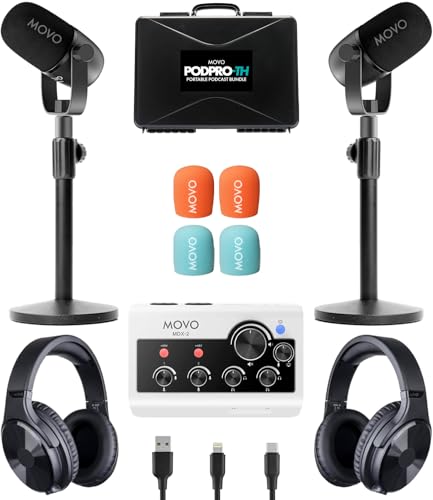
- PODCAST EQUIPMENT BUNDLE FOR 2 - The Movo PodPro-TH includes the dual channel MDX-2 usb audio interface, 2 CastMic XLR Dynamic Microphones, and 2 pairs of studio headphones. The perfect complete podcast kit for content creators on the go.
- MDX-2 DUAL USB AUDIO INTERFACE: Compact with battery-powered capabilities (8-hour battery life/3-hour with Phantom Power on). Includes USB-A, USB-C, and Lightning cables for seamless connection to PC, Mac, iPhone, iPad, and Android devices. Comes with a travel case for on-the-go recording. Includes 2 XLR inputs (with 48V phantom power), 2 headphone outputs, and stereo 1/4" outputs
- CASTMIC XLR PODCAST MICROPHONE: The CastMic cardioid XLR microphone delivers rich, balanced sound with a 40Hz-16kHz frequency response, minimizing background noise for studio-quality recordings. Built with durable metal construction, it's ideal for streaming, podcasting, and music recording in any environment

- The Original Mini Microphone: Mini Mic Pro is the wireless microphone for iPhone & Android used by creators. Trusted by thousands, it delivers studio-quality sound in a design small enough to clip onto your shirt or slip into your pocket.
- Seamless Connection: Designed to work right out of the box with your iPhone, Android, tablet, or laptop. With both USB-C and Lightning adapters included, Mini Mic Pro connects instantly—no apps, no bluetooth, no friction. Just pure, plug-and-play performance.
- Pro sound, anywhere: From voiceovers to viral interviews, Mini Mic Pro captures crystal-clear audio and cuts through background noise and even outdoors, thanks to included wind protection like high-density foam and a dead cat cover.

- 【All-in-One Audio Setup for Creators】Complete Podcast Equipment Bundle for Streaming, Recording & Content Creation.Designed as a complete audio solution, this kit includes an audio mixer, condenser microphone, and essential accessories—ideal for building a clean and efficient setup without extra equipment.
- 【Clear, Balanced & Reliable Sound】Enhanced Vocal Clarity with Built-in Noise Reduction.Capture clean, natural sound with reduced background noise. Optimized for streaming, podcasting, voice recording, and everyday content creation.
- 【Follow Singing Mode for Live Performance】Hear the Original Track While Your Audience Hears Only Your Voice & Music.Perfect for live singing, TikTok streams, and online performances. Monitor the original vocals privately while delivering a clean mix to your audience.

- 【Excellent Sound Quality】The Podcast Equipment Bundle uses advanced intelligent noise reduction technology and cardioid pickup technology to pick up your voice in all directions. The double-layer POP filter and windproof foam cap further reduce noise, and then it is processed by the professional DSP chip of the sound card to ensure clear and complete sound.
- 【Easy To Use】The recording equipment into a DJ Mixer. It offers a wealth of features and multiple controls to optimize your sound while fully controlling it. This set of podcasting comes with 2 podcasting microphones and 2 microphone hanging arm clippers, and when you plug it into your PC or smartphone, you easily start the live broadcast journey.
- 【All-In-One Podcast Kit】The Audio Interface Mixer supports 2 people using to broadcast at the same time. It can produce 10 sound effects, such as reverberation, treble and bass, noise reduction, accompaniment, Dodge, voice change and so on. It also contains 4 voice variations (female, male, child and monster). Four sound modes and 13 functions are not only made for live streaming, but also friendly to beginners.

- Custom three-capsule array: This professional USB mic produces clear, powerful, broadcast-quality sound for YouTube videos, Twitch game streaming, podcasting, Zoom meetings, music recording and more
- Blue VO!CE software: Elevate your streamings and recordings with clear broadcast vocal sound and entertain your audience with enhanced effects, advanced modulation and HD audio samples
- Four pickup patterns: Flexible cardioid, omni, bidirectional, and stereo pickup patterns allow you to record in ways that would normally require multiple mics, for vocals, instruments and podcasts
- Cut the Cables, Free to Pod - Dynamic microphone MAONO PD200W hybrid enjoy 3 ways for broadcast audio: go wireless for maximum freedom, USB for easy plug-and-play on phone, tablet, or computer, or XLR for a pro-level stable setup with audio interfaces
- Simple Setup, Studio-Level Sounds - With a premium 30mm dynamic capsule and cardioid pickup, the mic delivers studio-quality vocal reproduction for podcasting, streaming, and vocal recording. It achieves an ultra-clean 82dB signal-to-noise ratio and handles up to 128dB SPL without distortion
- Two Voices, One Perfect Conversation - PD200W supports a single receiver to connect two wireless desktop mics for duo podcasts or interviews. Records each mic to its own track so you can edit with precision, and keep every conversation crystal clear. The device also captures audio and video in perfect sync directly on the camera, eliminating the need for post-production alignment. (Please note: Camera/Lightning accessories are sold separately.)
- COMPLETE VIDEO PODCAST SETUP FOR 2: This all-in-one bundle provides everything you need to launch or upgrade your video podcast studio – two XLR dynamic microphones, two 4K cameras, two mic boom arms, and a USB audio interface. Ideal for co-hosted shows, interviews, and panel discussions without buying gear piece by piece.
- DUAL 4K UHD CAMERAS: Capture every angle of your podcast in stunning ultra-high-definition with two included 4K UHD cameras. Multi-camera setups give your show a polished, professional look for YouTube, Twitch, or any video platform.
- PROFESSIONAL-GRADE AUDIO INTERFACE: The Movo Phantom USB Audio Interface delivers studio-quality sound with high dynamic range preamps and 48V phantom power, capturing every nuance of speech and dialogue. Crystal-clear audio ensures your podcast sounds as good as it looks.
- USB/XLR Connectivity-AM8T comes with a dynamic microphone and a boom arm stand. Versatile PC gaming microphone kit with USB compatibility plug and play for PC in streaming or recording, without additional drivers. And also, while in XLR compatibility for mixer or sound card connection, the XLR studio vocal microphone is good at vocal, podcast, or musical instruments creation.
- Vibrant RGB Light-The streaming microphone RGB illuminates your gaming setup with customizable RGB lighting for a visually stunning game experience. You can easily control the RGB mode/colors or turn off by simply tapping the RGB button without making any complicated settings on specific software.
- Enhanced Features-Featured -50dB sensitivity and cardioid polar pattern, the USB recording mic kit not easily pick up background noise for delivering clear audio. The PC gaming microphone USB kit includes a boom arm for easy positioning, mute button and gain knob for precise control, headphones jack for real-time monitoring, and headphone volume control while streaming or recording.
The Ultimate Buying Guide for Podcasting Equipment
Starting a podcast is exciting! Good sound makes a big difference. This guide helps you choose the right gear. We will look at what matters most for clear recordings.
Key Features to Look For
When buying a microphone, look closely at these features. They decide how good your podcast sounds.
Microphone Type
- Dynamic Microphones: These are tough. They are great if you record in a noisy room. They pick up less background sound.
- Condenser Microphones: These capture very detailed sound. They need a quiet space to work best. Studio recordings use these often.
Connectivity
- USB Microphones: These plug straight into your computer. They are simple for beginners.
- XLR Microphones: These connect through an audio interface or mixer. They offer better quality and more control later on.
Polar Pattern
This shows where the microphone listens best.
- Cardioid: This pattern picks up sound mostly from the front. This is perfect for solo hosts or one-on-one interviews.
- Omnidirectional: This picks up sound from all directions. Use this for group discussions around one mic.
Important Materials and Build Quality
The materials used affect how long your gear lasts and how it sounds.
Sturdy Construction
Look for microphones and stands made of metal. Metal parts last much longer than cheap plastic. A heavy stand keeps your mic from tipping over easily.
Shock Mounts
A shock mount holds your microphone. It stops bumps and vibrations from reaching the mic. Good shock mounts use elastic bands to absorb movement. This keeps rumbles out of your recording.
Factors That Improve or Reduce Quality
Great equipment alone does not guarantee great sound. How you use it matters too!
Improving Quality
- Pop Filters and Windscreens: These small screens stop loud “P” and “B” sounds (plosives). They make speech sound smooth.
- Headphone Monitoring: Always wear headphones while recording. You hear exactly what the microphone hears. This lets you fix problems right away.
- Good Preamps: If you use an XLR setup, the preamp boosts the microphone signal. Better preamps add less unwanted noise.
Reducing Quality
- Room Echo: Hard, empty rooms create echoes. Sound bounces off walls. Record in a room with soft things like rugs, curtains, or couches.
- Gain Staging: Setting the input volume (gain) too high causes clipping (distortion). Set the gain so the sound is loud but never hits the red zone on your meter.
User Experience and Use Cases
Think about where and how you will podcast. This shapes your gear choice.
Beginner Podcaster (Home Office)
You need simplicity. A good USB microphone that sits on a desk stand is ideal. Focus on easy setup and reliable sound. Dynamic mics work well here because they handle some background noise.
Professional/Remote Interviews
If you interview guests remotely, prioritize good headphones for everyone. For in-person interviews, an audio interface becomes necessary. This lets you record multiple XLR microphones onto separate tracks for easier editing later.
Good gear makes your job easier. Choose equipment that fits your space and your goals.
10 FAQs About Podcasting Equipment
Q: What is the single most important piece of equipment?
A: The microphone is the most important piece. Listeners forgive small video issues, but bad audio quality makes people leave quickly.
Q: Do I need an audio interface right away?
A: No. If you use a USB microphone, you plug it directly into your computer. You only need an interface if you use XLR microphones or need to record more than one person at the same time.
Q: What is “gain” and why is it important?
A: Gain controls how sensitive the microphone is. You adjust the gain so your voice is loud enough without distorting (clipping). Too little gain makes your recording sound weak.
Q: Should I buy a boom arm or a desk stand?
A: A boom arm is usually better. It lets you position the mic perfectly close to your mouth. It also isolates the mic from desk bumps better than a small desk stand.
Q: What is the difference between a pop filter and a windscreen?
A: A pop filter is a circular screen placed in front of the mic to stop harsh “P” sounds. A windscreen is a foam cover that slips directly over the microphone head, usually to block wind noise outdoors or light plosives indoors.
Q: Are expensive microphones always better?
A: Not always. A mid-range microphone used correctly in a quiet room sounds better than a very expensive microphone used poorly in a noisy room.
Q: What kind of headphones should I use?
A: You should use closed-back, over-ear headphones. Closed-back designs prevent the sound from your headphones from leaking into the microphone.
Q: What is latency in podcast recording?
A: Latency is a delay. It is the small time gap between when you speak and when you hear yourself back through the headphones. Good audio interfaces have zero or very low latency.
Q: How do I record two people sitting next to each other?
A: You need two microphones. Use a single dynamic microphone with a cardioid pattern placed between both speakers, or use two separate dynamic mics positioned close to each person’s mouth.
Q: Can I use my gaming headset microphone?
A: You can start with it, but generally, no. Dedicated podcast microphones offer much clearer, richer sound quality than typical headset microphones. Upgrade your mic first for the best impact on quality.

Hi, I’m Tom Scalisi, and welcome to The Saw Blog! I started this blog to share my hands-on experience and insights about woodworking tools—especially saws and saw blades. Over the years, I’ve had the chance to work with a wide range of tools, and I’m here to help both professionals and hobbyists make informed decisions when it comes to selecting and using their equipment. Whether you’re looking for in-depth reviews, tips, or just advice on how to get the best performance out of your tools, you’ll find it here. I’m excited to be part of your woodworking journey!