
As an Amazon Associate I earn from qualifying purchases.
Choosing a Modem For High Speed Internet starts with your service type and plan. These models are designed for cable internet, while fiber, DSL, satellite, and fixed wireless customers need different equipment.
Check your provider’s approved modem list before buying, then match the modem’s DOCSIS standard and Ethernet port to your plan. You should also decide whether you want a standalone modem with a separate router or a single modem-router combo.
These five picks cover multi-gig cable service, built-in WiFi 6, larger-home coverage, and simpler plans up to 400 Mbps. Each one serves a different setup rather than repeating colour or size variants.
The guide below explains what sets each model apart, where its limits matter, and which type of cable internet setup it best suits.
Our Top 5 Modem For High Speed Internet Picks at a Glance
| Product | ||
|---|---|---|
 |
ARRIS Surfboard S33 DOCSIS 3.1 Modem Multi-gig standalone modem |
Check Price |
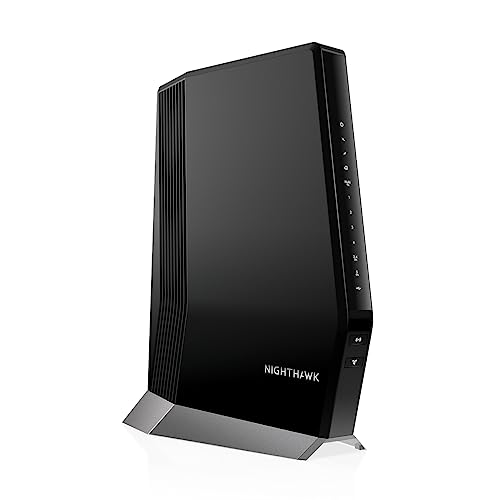 |
NETGEAR Nighthawk CAX80 WiFi 6 Cable Modem Router All-in-one high-speed home network |
Check Price |
 |
ARRIS Surfboard G34 DOCSIS 3.1 WiFi 6 Router WiFi 6 without separate router |
Check Price |
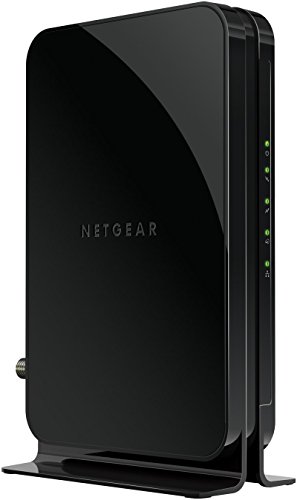 |
NETGEAR CM500 DOCSIS 3.0 Cable Modem Basic cable plans |
Check Price |
Top 5 Cable Modems: Detailed Reviews
1. ARRIS Surfboard S33 DOCSIS 3.1 Modem
The ARRIS Surfboard S33 is a Modem For High Speed Internet built for cable plans up to 2.5 Gbps. Its DOCSIS 3.1 support suits fast streaming, gaming, and large downloads, while the 2.5 GbE port lets compatible equipment use multi-gig service; a separate 1 GbE port supports standard wired connections. The compact modem has simple status lights and a straightforward activation process through your provider. It is modem-only, so you must add a Wi-Fi router or mesh system for wireless coverage. Check your provider’s compatibility before buying.
What We Like:
- Supports cable plans up to 2.5 Gbps.
- The 2.5 GbE port enables multi-gig wired networking.
- Includes a separate 1 GbE Ethernet port.
- Compact design saves space near your network equipment.
- Owning it can help you avoid monthly equipment charges.
What Could Be Improved:
- You need a separate Wi-Fi router or mesh system for wireless coverage.
- Provider compatibility still needs checking before purchase.
- Its multi-gig capability requires compatible network equipment and service.
Buy the S33 if you have, or plan to choose, a compatible high-speed cable plan and already own a router or mesh system. It is the fastest standalone option here, with useful 2.5 GbE connectivity. Skip it if you want an all-in-one modem-router or only need a basic cable plan.
2. NETGEAR Nighthawk CAX80 WiFi 6 Cable Modem Router
The NETGEAR Nighthawk CAX80 is a premium Modem For High Speed Internet and WiFi 6 router in one unit, designed for fast cable plans without a separate router. Its DOCSIS 3.1 modem supports Gigabit-plus service, while dual-band AX6000 WiFi covers up to 2,500 square feet and supports 30-plus devices. You get one 2.5 Gig Multi-Gig port plus four Gigabit ports for low-latency wired connections. The Nighthawk app guides setup, speed tests, guest networks, and device controls. Compatibility is plan-specific: Xfinity reaches 2.37Gbps, while Spectrum and Cox reach 1Gbps.
What We Like:
- One box replaces a separate modem and router.
- WiFi 6 capacity suits busy homes with many connected devices.
- Four Gigabit ports make wired consoles, PCs, and streamers easy to connect.
- The 2.5 Gig port supports compatible multi-gig hardware.
- App-based setup and management keep routine network controls accessible.
What Could Be Improved:
- Check your exact cable plan before buying; stated maximums differ sharply by provider.
- The built-in WiFi offers less flexibility than a separate modem and router if you want to upgrade either component independently.
- Actual coverage and speeds vary by home layout and connected devices.
Buy the CAX80 if you want one premium unit for a fast compatible cable plan, strong WiFi 6 capacity, and both multi-gig and Gigabit wired connections. Skip it if your provider is unsupported, your plan tops out well below its capabilities, or you want modular upgrades.
3. ARRIS Surfboard G34 DOCSIS 3.1 WiFi 6 Router
The ARRIS Surfboard G34 is a Modem For High Speed Internet and an all-in-one Wi-Fi 6 router for cable service. DOCSIS 3.1 supports plans up to 2.5 Gbps, while dual-band AX3000 Wi-Fi delivers up to 3 Gbps wireless performance across up to 2,500 square feet. Four Gigabit Ethernet ports let you connect wired devices directly. Setup involves connecting the cable and power, activating with your provider, then joining or customizing the Wi-Fi network. Its compact design and status LEDs keep the unit easy to place and monitor.
What We Like:
- DOCSIS 3.1 supports cable plans up to 2.5 Gbps.
- Built-in AX3000 Wi-Fi 6 removes the need for a separate router.
- Coverage extends up to 2,500 square feet.
- Four Gigabit Ethernet ports support multiple wired devices.
- Owning it can help you avoid monthly equipment rental charges.
What Could Be Improved:
- Each Ethernet port is limited to 1 Gigabit, so wired devices cannot use the modem’s full 2.5 Gbps plan capability individually.
- The advertised coverage is up to 2,500 square feet, so larger homes may need a different networking setup.
- You must confirm cable-provider compatibility and activate the unit before use.
Buy the G34 if you want one compact device for a compatible cable plan, Wi-Fi 6 coverage, and wired connections. It suits homes seeking up to 2.5 Gbps cable support without a separate router. Skip it if you need faster-than-Gigabit wired ports or your provider does not support it.
4. NETGEAR CM500 DOCSIS 3.0 Cable Modem
The NETGEAR CM500 is a DOCSIS 3.0 cable modem for a Modem For High Speed Internet setup built around a separate WiFi router. Its 16×4 channel bonding and single Gigabit Ethernet port provide the wired connection to your router or computer. NETGEAR lists support for cable plans up to 400 Mbps, with stated carrier limits of up to 200 Mbps on Xfinity and 150 Mbps on Cox. Replacing a rented modem can reduce equipment fees, while the separate-router design lets you choose your own wireless network hardware.
What We Like:
- It can replace a monthly cable modem rental.
- The Gigabit Ethernet port connects to a separate WiFi router or computer.
- It works with major cable providers including Xfinity and Cox.
- The separate-router design lets you choose your preferred wireless equipment.
- DOCSIS 3.0 suits basic, lower-speed cable plans.
What Could Be Improved:
- You need to buy or already own a separate WiFi router for wireless connectivity.
- Its stated speeds are limited by carrier plans, including up to 200 Mbps on Xfinity and 150 Mbps on Cox.
- DOCSIS 3.0 makes it a poorer fit for newer, faster cable services.
Buy the CM500 if you have a compatible lower-speed cable plan and want a straightforward modem for use with your own router. It makes sense for basic home networking and can replace rental equipment. Skip it if you need built-in WiFi or your provider plan requires newer DOCSIS technology.
How To Choose The Right High-Speed Cable Modem
Match the modem to your cable plan
Start by checking the service requirements for your cable plan before comparing features. A Modem For High Speed Internet should support the connection standard and speed tier your provider uses, or you may pay for service your equipment cannot fully handle. If you plan to upgrade later, choosing a model built for faster service can reduce the need for an early replacement.
Decide whether you need a separate router
A standalone modem connects your home to the internet, while a router distributes that connection to your devices. This two-device setup gives you more flexibility if you already own a router or want to replace either component separately. An all-in-one modem router keeps the setup simpler, but replacing one part later may mean replacing the combined unit.
Consider your home network needs
Think about how many devices use your network and whether they connect by WiFi or wired Ethernet. Homes with several active devices may benefit from a newer wireless standard, while a basic cable plan and light use may not justify extra network features. Check the placement of the equipment too, since a central location can matter more to wireless coverage than a longer feature list.
Plan for setup, compatibility, and ownership
Confirm that the equipment works with your cable provider and plan before buying. You should also decide whether you want to rent equipment, buy your own, or use a combination of provider and personally owned hardware. Finally, check the modem’s connections against your existing network and consider whether you prefer straightforward operation or more control over separate networking components.
Which Cable Modem Should You Choose?
The ARRIS Surfboard S33 is the best overall pick if you want a multi-gig standalone modem and already have, or plan to choose, a separate router. The NETGEAR Nighthawk CAX80 is the best alternative for a simpler setup because it combines a cable modem with a WiFi 6 home network. Choose the S33 for flexibility, or the CAX80 when an all-in-one arrangement suits your cable plan better.

Hi, I’m Tom Scalisi, and welcome to The Saw Blog! I started this blog to share my hands-on experience and insights about woodworking tools—especially saws and saw blades. Over the years, I’ve had the chance to work with a wide range of tools, and I’m here to help both professionals and hobbyists make informed decisions when it comes to selecting and using their equipment. Whether you’re looking for in-depth reviews, tips, or just advice on how to get the best performance out of your tools, you’ll find it here. I’m excited to be part of your woodworking journey!