
Imagine a world where your precious photos and important documents are trapped on paper, slowly fading with time. That’s where the magic of an image scanner comes in! These amazing devices can bring your physical memories and papers into the digital age, letting you save, share, and enjoy them forever.
But let’s be honest, picking the perfect scanner can feel like a riddle. Do you need something for quick snapshots, or a powerhouse for detailed artwork? The sheer number of choices can make your head spin, and figuring out which features truly matter can be a headache. You want a scanner that’s easy to use, captures great quality, and fits your budget, right?
This blog post is here to be your guide! We’ll break down the mystery of image scanners, explaining what makes them tick and what to look for. By the time you’re done reading, you’ll feel confident about choosing the scanner that’s just right for you, whether you’re a budding photographer, a student organizing notes, or just want to preserve family treasures. Let’s dive in and unlock the power of scanning!
Top Image Scanner Recommendations

- Scanner type: Document
- Connectivity technology: USB
- With Auto Scan Mode, the scanner automatically detects what you're scanning
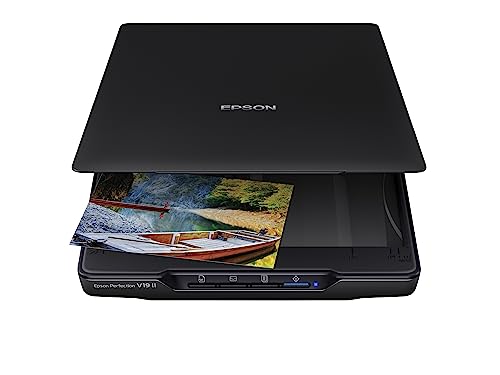
- CLEAR, DETAILED PHOTO SCANS — Achieve stand-out image clarity and detail with the Epson Perfection Scanner's 4800 dpi optical resolution1; Quickly enlarge your favorite photos with the help of this hardworking flatbed color scanner; scan up to 8.5" x 11.7"
- IMAGE AND DOCUMENT SCANNER — The versatility you need; Jumpstart your home and office projects with this compact and lightweight picture scanner; Easily scan photos, artwork, illustrations, books, documents, and more
- EFFORTLESS ONE-TOUCH SCANNING — Flatbed scanner allows you to scan documents and images in fewer steps with easy-to-use buttons³ making scanning a breeze; Scan letter-sized documents in as quickly as 10 seconds⁴

- Enjoy high speed scanning in as fast as 8 seconds, with the included USB Type-C cable. With USB Type-C the Cano scan lied 400 has one cable for data and power.
- Preserve detailed photos and images thanks to 4800 x 4800 dpi resolution, and with image enhancements, such as color restore and dust removal, Your photos will continue to look great.
- Enjoy ease of use with 'EZ' Buttons. With auto scan mode, the Scanner automatically detects what you are scanning; built-in PDF buttons, scan and save multi-page pdf's that are editable and searchable

- CLEAR, DETAILED PHOTO SCANS — Achieve stand-out image clarity and detail with the Epson Perfection Scanner's 4800 dpi optical resolution1; Quickly enlarge your favorite photos with the help of this hardworking flatbed color scanner
- IMAGE AND DOCUMENT SCANNER — The versatility you need; Jumpstart your home and office projects with this compact and lightweight picture scanner; Easily scan photos, artwork, illustrations, books, documents, and more
- ENHANCED SCANNING — Boost your scanning capability and creative projects by seamlessly stitching oversized images together or sending scans to cloud storage services³ with powerful Epson ScanSmart technology² included with this image scanner

- PORTABLE SCANNER FOR USE ON-THE-GO — The fastest and lightest mobile single-sheet-fed compact document scanner in its class¹
- QUICK DOCUMENT SCANNING ― This Epson ultra-fast scanner scans a single page as quickly as 5.5 seconds²; Windows and Mac compatible
- VERSATILE PAPER HANDLING ― Portable scanner scans documents up to 8.5 x 72 in; Also easily digitizes receipts and ID cards to make accounting, bookkeeping, and organizing simpler
- FAST DOCUMENT SCANNING — Document scanner with feeder allows you to speed through stacks with a 50-sheet Auto Document Feeder (ADF); Efficient office scanner to help you scan more productively
- INTUITIVE, HIGH-SPEED SOFTWARE — Quickly scan with this desktop document scanner; Epson ScanSmart Software lets you easily preview scans, email files, upload to the cloud, and more; Plus, automatic file naming saves even more time
- SEAMLESS INTEGRATION — Easily incorporate your data into most document management software with the included TWAIN driver; Office document scanner integrates seamlessly with business workflows

- The easiest way to scan photos and documents. Supports 3x5, 4x6, 5x7, and 8x10 in sizes photo scanning but also letter and A4 size paper. Optical Resolution is up to 600 dpi ( PS: two setting: 300dpi/ 600dpi).
- Fast and easy, 2 seconds for one 4x6 photo and 5 seconds for one 8x10 size photo@300dpi. You can easily convert about 1000 photos to digitize files in one afternoon and share with your family or friends.
- More efficient than a flatbed scanner. Just insert the photos one by one and then scan. This makes ePhoto much more efficient than a flatbed scanner.

- WIDE COMPATIBLE - Compatible with Windows XP/7/Vista/Mac OS 10.4 or above version. Scan images or pictures quickly and store files within seconds, plug and play, no need any software preinstalled.
- 3 IMAGE RESOLUTION - 3 modes of resolution for your options: 300dpi/600dpi/900dpi, you can save it in the clearest way, picture and document are showed clear as it is. Freely choose your suitable resolution.
- UP TO 32GB STORAGE - Great storage capacity as it supports 32G Micro SD card, JPEG/PDF format is all available, total meet your need for business trip or daily use. Store and Share your scans and information via searchable PDF files or JPEG into a micro SD/TF card.
Your Guide to Finding the Best Image Scanner
Why You Need an Image Scanner
Do you have old photos, important documents, or artwork you want to save digitally? An image scanner is your answer. It turns physical items into digital files. This guide helps you pick the right one.
Key Features to Look For
Resolution (DPI)
Resolution measures how much detail a scanner captures. Higher DPI means a clearer, sharper image. For everyday documents, 300 DPI is fine. For photos or artwork, aim for 600 DPI or higher. This lets you zoom in without losing quality.
Scanning Speed
Some scanners are fast, others are slow. Think about how many pages you need to scan. A faster scanner saves you time. Look at pages per minute (PPM) or seconds per page.
Connectivity
Most scanners connect via USB. Some offer Wi-Fi. Wi-Fi lets you scan from any device on your network. This is super convenient.
Scanner Type
Flatbed scanners are common. They work for photos, books, and single pages. Document scanners are built for speed. They often have an automatic document feeder (ADF). ADFs let you scan many pages at once.
Software
Good software makes scanning easy. Look for software that can organize your files. Some software can also edit images or convert them to text (OCR).
Important Materials and Build Quality
Most scanners use durable plastic. The glass bed on flatbed scanners should be strong. A sturdy scanner lasts longer. Check reviews for comments on how well the scanner is built.
Factors That Improve or Reduce Quality
Good Lighting
Scanners need good light to work best. Keep the scanner lid closed when scanning. This blocks outside light that can mess up the image.
Cleanliness
Dust or smudges on the scanner glass will show up in your scans. Wipe the glass with a soft cloth regularly. This is a simple step that makes a big difference.
Original Quality
A faded or damaged photo will still look faded or damaged when scanned. Scanners capture what’s there. They can’t fix a bad original.
User Experience and Use Cases
Home Use
For home users, a flatbed scanner is great. You can scan family photos, old letters, or kids’ artwork. Some scanners are small and don’t take up much space.
Office Use
Offices often need to scan many documents quickly. Document scanners with ADFs are ideal. They handle contracts, invoices, and reports with ease. OCR software is also helpful for making documents searchable.
Creative Projects
Artists and designers might use scanners for artwork. High-resolution scanners capture fine details. They can scan sketches, paintings, or even fabric textures.
Archiving
If you want to preserve memories or important records, a scanner is a must. Digital copies last a long time. They are safe from physical damage.
Scanner FAQs
Q: What is DPI and why is it important?
A: DPI stands for Dots Per Inch. It tells you how many tiny dots of color fit into one inch of your scanned image. More dots mean more detail and a clearer picture. For photos, a higher DPI is better.
Q: How fast is a fast scanner?
A: A fast scanner can scan many pages in a short time. Look at the PPM (pages per minute) number. A scanner with a high PPM will save you a lot of time if you have many pages to scan.
Q: What’s the difference between a flatbed and a document scanner?
A: A flatbed scanner has a glass surface where you place one item at a time. It’s good for photos, books, and single pages. A document scanner often has an ADF, which lets you load a stack of papers and scans them one after another automatically. Document scanners are usually faster for multiple pages.
Q: What is an ADF?
A: ADF stands for Automatic Document Feeder. It’s a part of a scanner that holds a stack of papers and feeds them into the scanner one by one. This makes scanning many pages much faster and easier.
Q: What is OCR?
A: OCR stands for Optical Character Recognition. It’s software that can turn scanned images of text into actual text you can edit or search. This is very useful for making scanned documents editable.
Q: Can a scanner fix old, faded photos?
A: No, a scanner captures the image as it is. It can’t restore faded colors or fix damage on the original photo. However, scanning them makes a digital copy you can then try to enhance with photo editing software.
Q: How do I keep my scanner working well?
A: Keep the scanner glass clean. Dust and smudges can ruin your scans. Also, make sure you close the lid when scanning to block out extra light.
Q: Do I need a scanner if I have a smartphone?
A: While smartphone scanning apps exist, a dedicated scanner usually offers better quality and resolution. They are also better for scanning delicate items like books without damaging them.
Q: What kind of documents can I scan?
A: You can scan almost any paper document. This includes photos, letters, receipts, reports, legal papers, and even thin books or magazines.
Q: Is Wi-Fi scanning really useful?
A: Yes, Wi-Fi scanning is very useful. It lets you send scans to your computer, tablet, or phone without needing cables. You can scan from anywhere in your home or office.

Hi, I’m Tom Scalisi, and welcome to The Saw Blog! I started this blog to share my hands-on experience and insights about woodworking tools—especially saws and saw blades. Over the years, I’ve had the chance to work with a wide range of tools, and I’m here to help both professionals and hobbyists make informed decisions when it comes to selecting and using their equipment. Whether you’re looking for in-depth reviews, tips, or just advice on how to get the best performance out of your tools, you’ll find it here. I’m excited to be part of your woodworking journey!