
As an Amazon Associate I earn from qualifying purchases.
Choosing among 75 TVs can be difficult because a large screen does not tell you how it will perform with movies, sports, games or everyday streaming. You also need to choose between smart TV platforms, standard LED, QLED and Mini-LED displays.
Picture technology matters most here. QLED and Mini-LED models can offer richer colour, stronger contrast and brighter highlights, while features such as Dolby Vision, HDR and high refresh rates suit film fans and gamers.
These picks were selected from the listed features, with priority given to meaningful differences rather than minor variations. The selection covers straightforward Fire TV models, Roku, QLED, Mini-LED and gaming-focused options.
Below, you will find the best match for each use case, followed by a practical guide to choosing the right 75-inch TV for your room and viewing habits.
Our Top 5 75 TVs Picks At A Glance
| Product | ||
|---|---|---|
 |
TCL QM6K 75-Inch QLED Mini-LED TV Bright-room viewing and gaming |
Check Price |
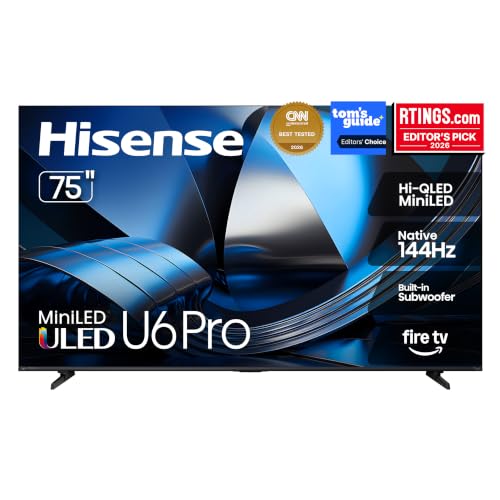 |
Hisense U6 Pro 75-Inch Mini-LED TV Gaming and glare-prone rooms |
Check Price |
 |
Hisense E6SR Series 75-Inch Roku TV Simple streaming and movies |
Check Price |
 |
INSIGNIA QF Series 75-Inch QLED Fire TV Vivid streaming-room picture |
Check Price |
 |
INSIGNIA F50 Series 75-Inch Fire TV Straightforward 4K streaming |
Check Price |
Top 5 75 TVs: Detailed Reviews
1. TCL QM6K 75-Inch QLED Mini-LED TV
For 75 Tvs shoppers, the TCL QM6K combines QLED colour with Mini-LED backlighting for bright images and more controlled contrast. Its Halo Control local dimming is designed to reduce blooming and preserve shadow detail, while support for Dolby Vision, HDR10+, HDR10 and HLG covers the major HDR formats. A native 144Hz refresh rate and Motion Rate 480 target smoother fast sports and gaming action. Google TV handles streaming discovery and adds Gemini recommendations, making this a feature-rich 75-inch option for mixed viewing.
What We Like:
- QLED colour and Mini-LED backlighting deliver bright images with strong contrast.
- Halo Control local dimming targets reduced blooming and better shadow detail.
- Dolby Vision, HDR10+, HDR10 and HLG provide broad HDR format support.
- The native 144Hz refresh rate suits fast sports and gaming action.
- Google TV with Gemini helps you discover movies and shows.
What Could Be Improved:
- The 144Hz refresh rate matters most with compatible fast-action content, not ordinary movies and shows.
- Google TV offers many features, but its interface may feel busier than a simpler streaming platform.
- Its broad feature set may be unnecessary if you only want basic 4K streaming.
Buy the TCL QM6K if you want a large-screen TV that balances bright-room viewing, controlled contrast, broad HDR support and smooth gaming performance. Skip it if you prefer a minimalist interface or mainly watch standard movies and shows, where the 144Hz capability offers less practical benefit.
2. Hisense U6 Pro 75-Inch Mini-LED TV
Among 75 Tvs, the Hisense U6 Pro stands out for bright-room viewing and gaming. Its Mini-LED backlight and Hi-QLED display aim to deliver strong contrast and vivid color, while the anti-reflection, glare-free treatment helps keep the picture easier to see in sunny spaces. Native 144Hz refresh supports smoother fast action, making it a natural fit for gaming and sports. A built-in subwoofer adds deeper bass without requiring a separate speaker, and the Hi-View AI Engine automatically adjusts the picture for different content.
What We Like:
- Native 144Hz refresh can keep fast gameplay and action looking smoother.
- Anti-reflection and glare-free treatment suits rooms with challenging light.
- Mini-LED backlighting and Hi-QLED color target vivid, high-contrast images.
- The built-in subwoofer adds bass directly from the TV.
- The slim, unibody design keeps the screen visually unobtrusive.
What Could Be Improved:
- The 144Hz capability matters most if your games or other content can take advantage of it.
- The built-in subwoofer may not replace a dedicated audio system for viewers seeking a larger, more expansive sound.
- Automatic picture adjustments from the AI engine may not suit viewers who prefer to set every picture parameter themselves.
Buy this Hisense if you want a large TV for gaming, sports, and streaming in a bright room, with smoother motion, reduced reflections, and stronger built-in bass. Skip it if you prefer fully manual picture control or already plan to use a separate sound system.
3. Hisense E6SR Series 75-Inch Roku TV
The Hisense E6SR Series is one of the more straightforward 75 Tvs for streaming and movie nights, combining Hi-QLED colour with Dolby Vision, HDR10 and HLG for richer-looking scenes. Roku keeps apps and content easy to navigate, while AI 4K upscaling improves the appearance of older or lower-resolution video. For gaming, Game Mode Plus, VRR and ALLM are designed to reduce lag and keep motion responsive. DTS Virtual:X adds a wider-sounding audio presentation, though its impact depends on your room and listening setup.
What We Like:
- Hi-QLED colour aims to give shows, films and skin tones a vivid, natural-looking appearance.
- Dolby Vision adds scene-by-scene HDR support for compatible movies and programmes.
- Roku provides a familiar, simple interface for streaming.
- AI 4K upscaling can make older content look cleaner and more detailed.
- VRR, ALLM and Game Mode Plus support more responsive controller-based gaming.
What Could Be Improved:
- The listed features do not specify peak brightness or a refresh rate, so this is not the clearest choice for demanding HDR or high-frame-rate gaming.
- DTS Virtual:X can broaden the sound, but it cannot replace the fuller impact of a dedicated soundbar or speaker system.
- If you prefer a highly customisable smart-TV platform, Roku offers a simpler experience than some alternatives.
Buy it if you want an uncomplicated Roku TV for streaming and movies, with useful HDR and gaming features included. It suits households that value easy navigation and broad content support. Skip it if you need assured high brightness, a specified high refresh rate or powerful built-in audio.
4. INSIGNIA QF Series 75-Inch QLED Fire TV
For shoppers comparing 75 Tvs, the INSIGNIA QF Series offers a colourful 4K Fire TV experience with QLED quantum-dot technology, which is designed to improve brightness and colour vibrancy. Direct LED backlighting supports uniform brightness and contrast, while Dolby Vision HDR can add more detailed highlights, shadows and colour in compatible content. Fire TV gathers streaming services and live shows in one interface, and the Alexa Voice Remote adds voice control. Dolby Atmos processing can create more spacious sound in supported movies, shows and games.
What We Like:
- QLED technology aims to deliver vivid, lifelike colours for streaming.
- Dolby Vision HDR can reveal more detail in bright and dark scenes.
- Direct LED backlighting is designed to provide consistent screen brightness.
- Fire TV brings movies, shows and live content together in one smart-TV interface.
- Dolby Atmos processing adds spatial audio support to compatible entertainment.
What Could Be Improved:
- The listed features do not mention local dimming, so you should not expect the more precise backlight control associated with that feature.
- No gaming-specific features are listed, making this less clearly suited to buyers seeking dedicated gaming benefits.
- Dolby Atmos processing is included, but the listed specifications do not establish the TV’s speaker performance.
Buy this INSIGNIA if you want a large, straightforward Fire TV with punchy QLED colour, Dolby Vision and simple access to streaming content. It suits a dedicated streaming room or family viewing setup. Skip it if you need confirmed gaming features, advanced backlight control or detailed evidence about built-in audio performance.
5. INSIGNIA F50 Series 75-Inch Fire TV
The INSIGNIA F50 Series is one of the more straightforward 75 Tvs for 4K streaming. Its 4K Ultra HD resolution sharpens compatible movies and shows, while HDR10 adds more color detail and contrast between bright and dark areas. Fire TV gives you access to extensive streaming content, including Prime Video, Netflix, Hulu and HBO Max. Alexa voice control lets you search, open apps and switch inputs without typing. DTS Virtual:X adds a more spacious effect, and HDMI ARC/eARC simplifies soundbar connections.
What We Like:
- 4K resolution also upscales existing content toward Ultra HD quality.
- HDR10 gives compatible movies and shows more contrast and color detail.
- Fire TV brings many streaming apps, channels and Alexa skills together.
- The Alexa Voice Remote makes searching and input switching quicker.
- HDMI ARC and eARC support can simplify connection to compatible audio equipment.
What Could Be Improved:
- It is designed for straightforward streaming rather than gaming-focused features.
- Built-in DTS Virtual:X may not replace a dedicated soundbar for fuller audio.
- You need compatible HDR10 content to see the biggest picture benefits.
Buy this INSIGNIA if you want a large, uncomplicated 4K TV with Fire TV access, Alexa control and HDR10 support. It suits viewers focused on streaming and everyday movies. Skip it if gaming features or a more advanced display are your priorities, or if you expect built-in speakers to deliver soundbar-level impact.
How To Choose Among 75 TVs
Choosing among 75 Tvs starts with your room, your viewing habits, and the way you plan to use the screen. A large TV can make films and shows feel more involving, but the best choice depends on whether you watch in bright daylight, stream through a built-in platform, or connect a console. Set your priorities before comparing panel labels and smart-TV features.
Match the TV to your room
Light is one of the most important factors. If your room gets strong daylight or has lamps facing the screen, focus on a model intended for bright-room viewing or glare-prone spaces. For a darker room, you may place more weight on movie viewing and the picture characteristics you prefer. Also measure your furniture and viewing area first, since a 75-inch screen needs enough physical space and a comfortable viewing distance.
Choose for streaming and daily use
Think about how you watch content. A built-in Roku or Fire TV platform can simplify access to streaming, while a straightforward interface may matter more than a long list of advanced features. Check which platform fits your existing habits and accounts, especially if you want to avoid switching between a TV interface and a separate streaming device.
Consider gaming before you buy
Console and PC players should prioritise the features that affect responsiveness and compatibility, rather than judging a TV only by its film picture. Look for a model specifically suited to gaming if that is a major part of your use. You should also consider how many devices you will connect and whether the TV will serve as both your gaming display and everyday streaming screen.
Set a sensible picture priority
Panel descriptions such as QLED and Mini-LED can help you narrow the list, but they do not replace your own priorities. Decide whether you care most about a vivid image, bright-room visibility, movie watching, gaming, or simple 4K streaming. Then compare the picks against that use case instead of assuming the most feature-focused option will suit everyone.
Which 75-Inch TV Should You Choose?
The TCL QM6K 75-Inch QLED Mini-LED TV is the best overall pick because it covers two demanding uses: bright-room viewing and gaming. If glare and gaming are your main concerns, the Hisense U6 Pro 75-Inch Mini-LED TV is the strongest alternative. Choose the Hisense E6SR for simple Roku streaming, or an Insignia model if you want straightforward Fire TV use or a vivid streaming-room picture.

Hi, I’m Tom Scalisi, and welcome to The Saw Blog! I started this blog to share my hands-on experience and insights about woodworking tools—especially saws and saw blades. Over the years, I’ve had the chance to work with a wide range of tools, and I’m here to help both professionals and hobbyists make informed decisions when it comes to selecting and using their equipment. Whether you’re looking for in-depth reviews, tips, or just advice on how to get the best performance out of your tools, you’ll find it here. I’m excited to be part of your woodworking journey!