
As an Amazon Associate I earn from qualifying purchases.
Choosing Raspberry Pi Os hardware can be confusing because these products range from bare boards to complete desktop systems. Your best choice depends on whether you need plug-and-play convenience, more memory, bundled storage, or a lower-cost starting point.
Pay attention to the Raspberry Pi generation, RAM, included storage, power supply, cooling, and case. A complete kit can save you from sourcing essential accessories, while a standalone board may suit you if you already have compatible parts.
These picks were selected from the listed specifications, with priority given to useful differences in performance, setup convenience, included components, and project suitability. They are arranged from the most capable complete system to simpler and more affordable starting points.
This guide covers a fully assembled Pi 5 desktop, Pi 5 starter kits, a well-equipped Pi 4 bundle, and a Pi 3 kit for basic Raspberry Pi OS projects.
Our Top 5 Raspberry Pi Os Picks at a Glance
| Product | ||
|---|---|---|
 |
CanaKit Raspberry Pi 5 Desktop PC With SSD Plug-and-play desktop use |
Check Price |
 |
CanaKit Raspberry Pi 5 Starter Kit PRO High-memory projects |
Check Price |
 |
CanaKit Raspberry Pi 5 Essentials Kit Straightforward Pi 5 entry |
Check Price |
 |
CanaKit Raspberry Pi 4 4GB Starter PRO Kit Balanced home projects |
Check Price |
 |
CanaKit Raspberry Pi 3 B+ Starter Kit Basic Raspberry Pi projects |
Check Price |
Top 5 Raspberry Pi Os: Detailed Reviews
1. CanaKit Raspberry Pi 5 Desktop PC With SSD
This Raspberry Pi Os setup is a fully assembled Pi 5 desktop with 8GB RAM, making it ready for plug-and-play use rather than component assembly. The 256GB PCIe Pi NVMe SSD provides substantially more working space than a basic storage setup and arrives pre-loaded with the Pi 64-Bit OS. Its M.2 HAT+ connects the SSD, while the Turbine Black Case houses the computer. A 45W USB-C PD power supply completes the package, so you can focus on using the system instead of gathering compatible parts.
What We Like:
- The fully assembled design gets you running with minimal setup.
- 8GB of RAM suits demanding multitasking and memory-heavy projects.
- The 256GB NVMe SSD provides useful room for applications and files.
- The included M.2 HAT+ supports the bundled PCIe SSD configuration.
- The case and 45W USB-C power supply make the package feel complete.
What Could Be Improved:
- The 256GB SSD may feel limiting if you plan to store large media collections or many projects.
- This bundle includes more capability than you need for simple beginner experiments.
- A preconfigured desktop package offers less flexibility than selecting each component yourself.
Buy it if you want the easiest route to a capable Pi 5 desktop, especially for multitasking, storage-heavy work, or projects that benefit from 8GB of RAM. Skip it if you only need a basic Raspberry Pi for simple projects, or if you prefer choosing the case, storage, and accessories separately.
2. CanaKit Raspberry Pi 5 Starter Kit PRO
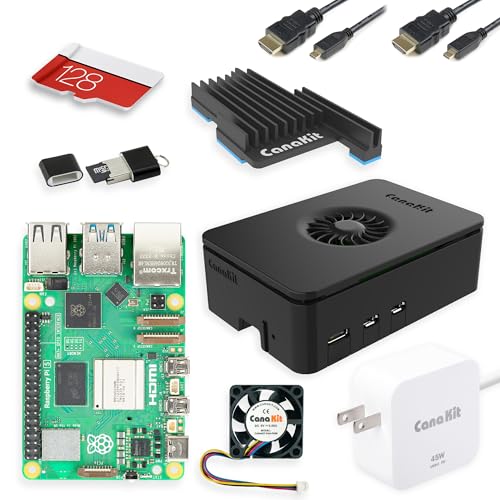
The CanaKit Raspberry Pi 5 Starter Kit PRO pairs a Raspberry Pi 5 with a 2.4GHz 64-bit quad-core CPU and 8GB of RAM, giving you plenty of memory for demanding projects. Its 128GB microSD card arrives preloaded with 64-bit Raspberry Pi Os, so you can begin with less software preparation, while the included USB card reader helps manage the card. The Turbine Black case, low-noise bearing fan, and black anodized mega heat sink support cooling, and the 45W PD power supply is made for the Pi 5.
What We Like:
- The 8GB RAM suits memory-intensive Raspberry Pi projects.
- The preloaded 128GB card reduces initial setup work.
- The case gives the board a dedicated enclosure.
- The low-noise fan and large heat sink support quieter cooling.
- The included 45W power supply matches the Raspberry Pi 5.
What Could Be Improved:
- The 8GB configuration may be more capacity than you need for basic projects.
- The 128GB card can be unnecessary if your files and software needs are modest.
- The kit’s cooling hardware is more involved than a minimal Pi setup requires.
Buy this kit if you want a Raspberry Pi 5 foundation for high-memory projects and prefer having storage, cooling, a case, and power included. Skip it if you only need a basic Pi for simple experiments, where the extra RAM and larger setup may offer limited practical value.
3. CanaKit Raspberry Pi 5 Essentials Kit
The CanaKit Raspberry Pi 5 Essentials Starter Kit (4GB RAM) is a straightforward entry point for users who want a Pi 5 platform without choosing a higher-memory configuration. Its 4GB of RAM provides a focused setup for learning, everyday Raspberry Pi Os projects, and general experimentation. The Essentials designation also keeps the choice simple: you can start with the core kit rather than comparing more specialised options. This makes it a sensible fit for beginners who want a current Raspberry Pi foundation without aiming at demanding, memory-heavy workloads.
What We Like:
- The Pi 5 platform gives beginners a current starting point.
- 4GB of RAM keeps the configuration practical and uncomplicated.
- The Essentials positioning makes the kit easier to choose.
- It suits learning and basic Raspberry Pi projects.
- It avoids paying for a higher-memory setup you may not need.
What Could Be Improved:
- The 4GB configuration is less suitable for projects that demand substantial memory.
- Users wanting a more specialised or high-memory setup should consider another kit.
- The Essentials focus may feel limiting if you already know you need extra capability.
Buy this kit if you want a simple way into the Pi 5 platform for learning, basic projects, and everyday experimentation. It is a sensible choice for beginners who do not need extensive memory. Skip it if your plans involve high-memory workloads or specialised projects that require a more capable configuration.
4. CanaKit Raspberry Pi 4 4GB Starter PRO Kit
This Raspberry Pi Os setup pairs the Raspberry Pi 4 Model B with 4GB of RAM, a 1.5GHz 64-bit quad-core CPU, and a pre-loaded 32GB EVO+ Class 10 microSD card. You also get a USB card reader, heat sinks, a low-noise fan, and a case with an integrated fan mount, so the core hardware and cooling are covered. The 3.5A USB-C power supply includes a noise filter, while the six-foot display cable supports up to 4K60p. A USB-C PiSwitch adds convenient on/off control.
What We Like:
- 4GB of RAM suits balanced home projects and everyday experimentation.
- The 32GB microSD card gives you storage without a separate setup step.
- Included heat sinks, fan, and case provide a complete cooling arrangement.
- The six-foot display cable offers flexible positioning.
- The PiSwitch makes power control more convenient.
What Could Be Improved:
- The 32GB storage may feel limiting for larger projects or extensive files.
- The included power supply has a US plug, which may not suit users elsewhere.
- If your projects need more memory, a 4GB board may be too restrictive.
Buy this kit if you want a balanced Raspberry Pi 4 bundle for home projects, learning, and general experimentation without sourcing cooling, storage, or power separately. Skip it if you need substantial memory, more storage from the outset, or a power supply designed for a non-US outlet.
5. CanaKit Raspberry Pi 3 B+ Starter Kit
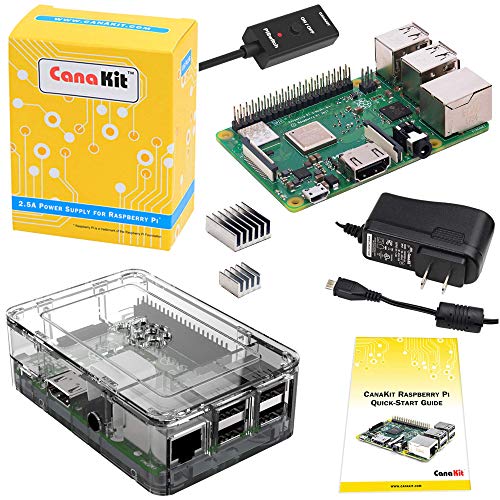
The CanaKit Raspberry Pi 3 B+ Starter Kit is a simple base for Raspberry Pi Os and basic Raspberry Pi projects. Its 1.4 GHz 64-bit quad-core processor and 1 GB of RAM suit light desktop tasks, coding, home automation, and beginner experiments. Dual-band 2.4GHz and 5GHz wireless LAN gives you flexible network connectivity, while enhanced Ethernet supports wired use. The clear case protects the board, and the two aluminum heat sinks help manage heat. CanaKit also includes a UL-listed 2.5A power supply, micro USB cable with noise filter, and quick-start guide.
What We Like:
- The included clear case protects the board while keeping its layout visible.
- Dual-band wireless gives you both 2.4GHz and 5GHz network options.
- The dedicated 2.5A power supply is designed for the Raspberry Pi 3 B+.
- The heat sinks add basic cooling for sustained beginner projects.
- The quick-start guide makes this a less intimidating first Pi.
What Could Be Improved:
- The 1 GB of RAM limits demanding multitasking and heavier software.
- The Raspberry Pi 3 B+ has less performance headroom than newer Raspberry Pi boards.
- The micro USB power connection is less convenient than newer USB-C designs.
Buy this kit if you want an approachable, ready-to-assemble foundation for basic Raspberry Pi projects, light computing, coding, or home automation. It suits beginners who value the included case, power supply, cooling, and wireless networking. Skip it if you need substantial multitasking performance or want the extra headroom of a newer Pi.
How to Choose a Raspberry Pi OS Setup
Choosing a Raspberry Pi Os setup starts with deciding what you want to do, not simply choosing the newest board. A desktop replacement, a project computer, and a first learning kit can need different accessories and different levels of convenience. Match the kit to your experience, workload, and willingness to assemble or configure hardware.
Raspberry Pi Os setup and intended use
Start by defining the main job. If you want a plug-and-play desktop, prioritise a complete arrangement that includes the storage and accessories needed for everyday use. For electronics, coding, or home automation projects, you may value a flexible kit that leaves room for experimentation. A simpler setup can make more sense if you are learning the basics and do not need extra hardware yet.
Choose the right performance level
The board generation and memory configuration affect which projects feel appropriate. Raspberry Pi 5 kits suit people planning more demanding work or wanting a newer platform, while a Raspberry Pi 4 setup can offer a sensible middle ground for general home projects. A Raspberry Pi 3 B+ kit is aimed at basic projects, so it may be the better choice when your needs are modest and you want to keep the setup uncomplicated.
Check storage and included equipment
Review what the kit includes before buying. Storage matters because the operating system, applications, and project files all need somewhere to live; an SSD-based arrangement is particularly relevant if you want desktop-style use. Also check whether the package provides the power supply, case, cooling, cables, and other essentials you expect. Missing pieces can turn an apparently simple purchase into a separate shopping list.
Think about your next project
Leave some headroom if you already know your projects will grow. A high-memory kit may suit workloads that need more capacity, while an essentials kit can be preferable when you want a straightforward entry point without paying for extras you will not use. Consider how much setup you are comfortable doing, too: convenience has value, but a more basic kit can teach you more about how the system fits together.
Which Raspberry Pi OS Setup Fits You?
The CanaKit Raspberry Pi 5 Desktop PC With SSD is the best overall pick for you if you want the most straightforward route to desktop use, with storage already central to the setup. The CanaKit Raspberry Pi 5 Starter Kit PRO is the best alternative for high-memory projects, giving you a better match for workloads that need more capacity. Choose the Essentials Kit instead if you want a simpler Pi 5 starting point.

Hi, I’m Tom Scalisi, and welcome to The Saw Blog! I started this blog to share my hands-on experience and insights about woodworking tools—especially saws and saw blades. Over the years, I’ve had the chance to work with a wide range of tools, and I’m here to help both professionals and hobbyists make informed decisions when it comes to selecting and using their equipment. Whether you’re looking for in-depth reviews, tips, or just advice on how to get the best performance out of your tools, you’ll find it here. I’m excited to be part of your woodworking journey!