
As an Amazon Associate I earn from qualifying purchases.
The right Bluetooth Keyboard And Mouse combo can simplify your desk, but the best choice depends on how and where you work. A compact layout saves space, while a full-size keyboard makes familiar typing easier.
Pay attention to connection options, device switching, keyboard layout, comfort features, and power design. Bluetooth-only models suit compatible computers and tablets, while tri-mode or dual-connectivity options offer more flexibility.
These five picks cover distinct needs rather than repeating color or size variants. The selection includes quiet full-size designs, compact keyboards with number pads, Apple-focused portability, multi-device switching, and rechargeable RGB lighting.
Our guide starts with the strongest all-around option, then compares what each combo does best and the trade-offs to consider before choosing.
Our Top 5 Bluetooth Keyboard And Mouse Picks at a Glance
| Product | ||
|---|---|---|
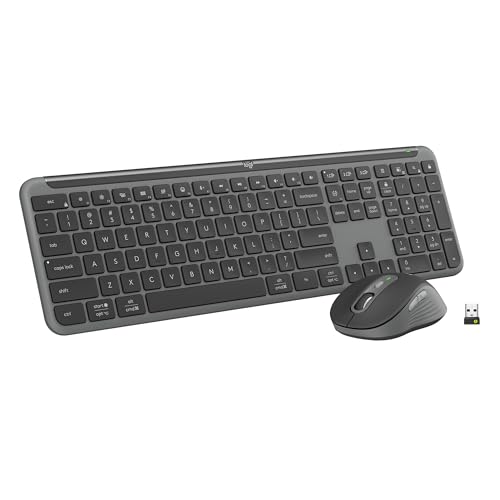 |
Logitech MK955 Signature Slim Combo Quiet multi-device work |
Check Price |
 |
Logitech MK250 Bluetooth Combo Compact everyday desks |
Check Price |
 |
seenda COE200 Bluetooth Combo Flexible office setups |
Check Price |
 |
Logitech Pebble 2 Combo for Mac Portable Apple setups |
Check Price |
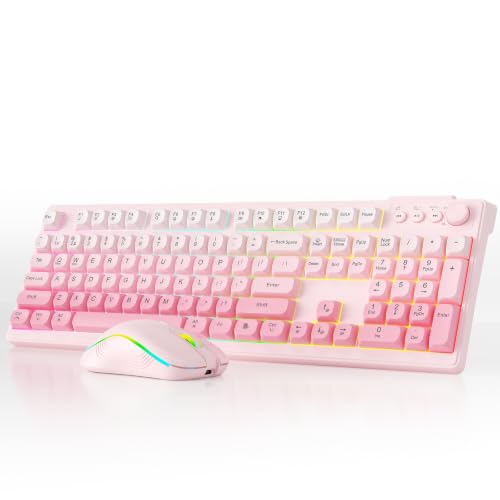 |
BOOVIK Tri-Mode RGB Rechargeable Combo Rechargeable RGB setups |
Check Price |
Top 5 Bluetooth Keyboard And Mouse: Detailed Reviews
1. Logitech MK955 Signature Slim Combo
The Logitech MK955 Signature Slim Combo is a full-size Bluetooth Keyboard And Mouse set designed for quiet work across multiple devices. Its laptop-style keyboard offers familiar typing, while the contoured M750 L Signature Plus mouse suits larger hands and uses SilentTouch to reduce click noise. A single tap switches the keyboard among a laptop, tablet, and phone, making it practical for mixed work and personal setups. The mouse’s SmartWheel supports precise line-by-line scrolling or faster movement through long pages. Logi Options+ adds customizable keys, buttons, and shortcuts on Windows and macOS.
What We Like:
- Quiet typing and clicking help reduce distractions in shared workspaces.
- The full-size keyboard gives you familiar laptop-style spacing.
- You can switch keyboard input across three devices with one tap.
- The SmartWheel handles both precise and fast scrolling.
- Customizable controls add useful shortcuts through Logi Options+.
What Could Be Improved:
- The full-size layout takes more desk space than a compact combo.
- The mouse is designed for larger hands, so smaller-handed users may find its shape less comfortable.
- Keyboard customization through Logi Options+ is available on Windows and macOS, not stated for mobile devices.
Buy the Logitech MK955 if you want a quiet, full-size setup for switching among a computer, tablet, and phone, especially if you have larger hands or share your workspace. Skip it if desk space is limited, you prefer a compact keyboard, or you need a mouse shaped for smaller hands.
2. Logitech MK250 Bluetooth Combo
The Logitech MK250 is a compact Bluetooth Keyboard And Mouse combo for everyday desks that need full function without a full-size footprint. Its keyboard keeps a number pad, arrow keys, and F-key shortcuts, so you can enter figures and navigate documents without relying on function layers. Bluetooth pairing needs no dongle or USB port, while deep-profile keys and an adjustable tilt leg support comfortable typing. The small, ambidextrous mouse suits either hand and travels easily. A spill-resistant design and 12-month keyboard battery life add practical durability.
What We Like:
- The compact layout saves desk space without removing the number pad.
- Dedicated arrow keys and F-key shortcuts keep common commands accessible.
- Bluetooth connection avoids occupying a USB port with a receiver.
- Deep-profile keys and the adjustable tilt leg make typing more comfortable.
- The small ambidextrous mouse is easy to pack and use with either hand.
What Could Be Improved:
- Bluetooth-only connectivity will not suit devices that lack Bluetooth.
- The compact mouse may feel limiting if you prefer a larger pointing device.
- The listed 12-month battery life applies to the keyboard, with no mouse battery duration provided.
Buy the MK250 if you want a space-saving Bluetooth setup that still includes a number pad, arrow keys, and F-key shortcuts for everyday office work. Skip it if you need a USB receiver, a larger mouse, or confirmed battery-life information for both devices.
3. seenda COE200 Bluetooth Combo
The seenda COE200 is a Bluetooth Keyboard And Mouse combo for switching between two devices, using Bluetooth 5.0 or the included USB-A receiver. That makes it practical for a Bluetooth laptop and a desktop without Bluetooth, with no drivers required. Its full-size keyboard includes a built-in wrist rest, while the symmetric mouse uses quiet clicks and offers 1000, 1600, or 2400 DPI settings. Low-noise typing suits shared spaces, and the keyboard and mouse offer up to 365 days of standby, though batteries are not included.
What We Like:
- Switch between two devices through Bluetooth or the USB-A receiver.
- The built-in wrist rest supports longer typing sessions.
- Quiet keys and mouse clicks are considerate in offices and shared rooms.
- Adjustable 1000, 1600, and 2400 DPI settings suit different cursor preferences.
- Broad Windows, macOS, iPadOS, iOS, and Android compatibility adds flexibility.
What Could Be Improved:
- The keyboard and mouse use replaceable AAA and AA batteries rather than rechargeable cells.
- The USB connection requires an available USB-A port or an adapter on newer devices.
- The full-size design is less convenient for tight desks or frequent travel.
Buy the seenda COE200 if you need one quiet, full-size set for a Windows-and-Mac workspace, especially when one device uses USB-A and another uses Bluetooth. Skip it if you want rechargeable hardware, a compact travel setup, or a keyboard designed specifically for Apple layouts.
4. Logitech Pebble 2 Combo for Mac
The Logitech Pebble 2 Combo for Mac is a slim, quiet Bluetooth Keyboard And Mouse set for Apple users who move between a Mac, iPad, and iPhone. Bluetooth pairing supports up to three devices, with a button press for switching between macOS, iPadOS, and iOS. The keyboard provides laptop-like, quiet typing, while Silent Touch technology reduces mouse-click noise. You can customize its 10 Fn keys and mouse middle button in the Logi Options+ app for shortcuts such as search or screen capture. The keyboard offers a stated three-year battery life and mouse two years; batteries are included.
What We Like:
- Switch between up to three Apple devices with a button press.
- Quiet typing and clicking work well in shared offices or quiet rooms.
- The slim, lightweight design is easy to move between workspaces.
- Customizable Fn keys and mouse controls can reduce repetitive actions.
- Long stated battery lives minimize battery changes, and batteries are included.
What Could Be Improved:
- Its stated device support focuses on macOS, iPadOS, and iOS, making it less suitable for mixed-platform households.
- Advanced shortcut customization requires the Logi Options+ app, adding setup beyond basic Bluetooth pairing.
- The compact, slim design may not suit you if you prefer a more substantial desktop keyboard and mouse.
Buy it if you want a quiet, portable combo for switching among several Apple devices, especially in shared or flexible workspaces. Skip it if you need broad non-Apple compatibility, dislike installing companion software, or prefer full-size peripherals with a more substantial desktop feel.
5. BOOVIK Tri-Mode RGB Rechargeable Combo
The BOOVIK Tri-Mode RGB Rechargeable Combo is a full-size Bluetooth Keyboard And Mouse set for workspaces that need flexibility and visual customization. Its 104-key membrane keyboard includes function keys, a number pad, three multimedia keys, and a volume knob, so you do not give up desktop controls. You can connect through Bluetooth, 2.4GHz wireless, or USB-C, while USB-C recharging avoids disposable batteries. Customizable RGB lighting offers 16.8 million colors and nine preset effects. The keyboard has a 2000 mAh battery, and the mouse has a 600 mAh battery.
What We Like:
- Full-size 104-key layout includes function keys and a number pad.
- Tri-mode connectivity lets you switch among Bluetooth, 2.4GHz, and wired USB-C use.
- USB-C rechargeable batteries reduce the need for disposable cells.
- RGB lighting provides 16.8 million colors and nine preset effects.
- The keyboard adds useful multimedia keys and a physical volume knob.
What Could Be Improved:
- The full-size design takes more desk space than a compact combo.
- A membrane keyboard may feel less crisp than a mechanical model.
- RGB lighting and a pink finish may not suit conservative office setups.
Buy it if you want a full-size keyboard, rechargeable power, three connection options, and customizable RGB lighting in one set. It fits flexible home-office or entertainment setups well. Skip it if you need a compact travel combo, a minimalist business look, or the sharper feel and sound of mechanical keys.
How to Choose a Bluetooth Keyboard And Mouse Combo
Choose the right connection and device support
A Bluetooth Keyboard And Mouse set should match the devices you actually use, including computers, tablets, and phones. Check the stated operating-system support before buying, especially if you move between Windows, macOS, iPadOS, or other platforms. If you regularly switch between devices, prioritize a combo that clearly supports multi-device use rather than assuming every Bluetooth set handles it equally well.
Match the layout to your workspace
Size affects both comfort and portability. A full-size keyboard can provide a familiar layout and dedicated controls, while a compact option takes less desk space and travels more easily. Look at the mouse shape, keyboard footprint, and key arrangement together; a small mouse paired with a wide keyboard may not suit a portable setup, and a compact layout can require more adjustment.
Consider noise, comfort, and daily workload
Quiet keys and clicks matter if you share an office, work near other people, or take calls at your desk. For long writing sessions, pay attention to the keyboard’s spacing, height, and overall feel, as well as whether the mouse fits your hand comfortably. RGB lighting can add visual appeal, but it should not outweigh practical concerns such as visibility, control placement, and comfort.
Check power, charging, and included extras
Review how each set is powered and whether the keyboard and mouse use replaceable batteries, rechargeable power, or another arrangement. A rechargeable combo may suit you if you prefer charging rather than keeping spare batteries available, while a battery-powered design may fit a simpler routine. Also confirm what is included, such as any receiver or charging accessories, and make sure the setup works with the ports and connection methods available on your devices.
Which Bluetooth Keyboard And Mouse Combo Should You Choose?
The Logitech MK955 Signature Slim Combo is the best overall pick here for quiet, multi-device work, making it the strongest fit for a busy desk shared across devices. Choose the Logitech MK250 Bluetooth Combo as the best alternative if you want a more compact everyday setup. The other options target clearer needs: flexible office arrangements, portable Apple use, or rechargeable RGB-focused setups.

Hi, I’m Tom Scalisi, and welcome to The Saw Blog! I started this blog to share my hands-on experience and insights about woodworking tools—especially saws and saw blades. Over the years, I’ve had the chance to work with a wide range of tools, and I’m here to help both professionals and hobbyists make informed decisions when it comes to selecting and using their equipment. Whether you’re looking for in-depth reviews, tips, or just advice on how to get the best performance out of your tools, you’ll find it here. I’m excited to be part of your woodworking journey!