
Building a new computer or upgrading an old one can be exciting, but one part often gets overlooked: the power supply unit, or PSU. It’s the heart of your PC, quietly powering everything. But what happens when your wallet feels a little light, and you need a PSU that won’t break the bank?
Choosing a budget PSU can be a real headache. You want something that works well and won’t fry your expensive components, but the cheapest options sometimes feel like a gamble. You might worry about whether it’s strong enough for your games or if it will last a long time. It’s easy to feel lost when looking at all the different wattages and brands!
In this post, we’ll help you navigate the world of budget PSUs. We’ll show you what to look for and what to avoid so you can get the best bang for your buck. By the end, you’ll feel confident picking a power supply that’s both affordable and reliable, letting you get back to enjoying your PC without any worries.
Top Budget Psu Recommendations

- Delivers 500 Watt Continuous output at plus 40 degree. Compliance with Intel ATX 12 Volt 2.31 and EPS 12V 2.92 standards
- 80 PLUS Certified, 80 percentage efficiency under typical load
- Supports (2) PCI E 6plus2pin Connectors. Active (PFC) Power Factor Correction, MTBF: 100,000 hours

- ATX 3.1 and PCIe 5.1 Support: Fully compatible with Intel ATX 3.1 specifications, with native PCIe 12V-2x6 (12+4 pin) connectors for modern GPUs.
- 80 PLUS Gold Efficiency: Provides up to 90% efficiency, reducing energy consumption and heat output during operation.
- Smart Zero Fan Technology: Automatically adjusts fan speed based on load, minimizing noise during low-load operations.
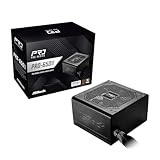
- 80 PLUS Bronze Efficiency: Provides reliable 650W power with 80 PLUS Bronze certification for energy-efficient operation
- ATX 3.1 Compatible: Meets latest ATX 3.1 standards with 200% power excursion capability for next-generation components
- Stable 12V Output: Delivers 54.1A on the +12V rail for consistent performance with modern CPUs and graphics cards

- 80 PLUS GOLD & CYBENETICS PLATINUM: 80 PLUS Gold, Cybenetics Platinum, and Cybenetics A++ certify high energy efficiency and exceptionally quiet operation. Low power consumption, effective cooling, and minimal noise make it ideal for gaming and high-end PCs.
- FUTURE-PROOF YOUR SYSTEM: Pure Power 13 M 1000W is an ATX 3.1 PSU and comes with both native integration of the 12V-2x6 connector for next-generation PCIe 5.1 graphics cards, and 4 PCIe 6+2-pin connectors for support of current-gen GPUs. This makes the PSU extremely versatile and the perfect choice for powerful systems of today and the ones to come.
- THE NEW STANDARD OF POWER: For massive transient loads Pure Power 13 M offers 1000W of continuous power with one massive 12V rail. Even if the graphics card demands excessive power for a short time: Pure Power 13 M 1000W handles power excursions up to double its rated power with ease. This ensures reliable operation with the next generation of processors and graphics cards.

- Intel ATX 3.0 & 3.1 Ready.
- Semi Modular 80 PLUS Bronze Certified.
- Native PCIe 5.1 / Gen 5 12+4 Pin 12V-2x6 Cable.

- 80 PLUS Certified with Efficiency of up to 86%
- Continuous Power Design
- Has well Ready

- Power Supply Specifications: Apevia Venus 500W ATX Power Supply delivers reliable power for your computer system
- Comprehensive Connector Options: 1 x 20/24pin Main Power, 1 x 4+4pin 12V, 1 x 6+2 PCI Express, 3 x SATA, 3 x Peripheral, 1 x Floppy connectors for versatile component compatibility
- Advanced Cooling System: Auto-Thermally Controlled Black 120mm Fan with 115/230V Switch for efficient temperature management
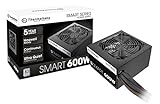
- Delivers 600W Continuous output at plus 40℃. Compliance with Intel ATX 12V 2. 31 and EPS 12V 2. 92 standards
- 80 PLUS Certified – 80% efficiency under typical load. Power good signal is 100-500 millisecond
- Supports (2) PCI-E 6 plus 2pin Connectors. Active (PFC) Power Factor Correction, MTBF: 100, 000 hours
Finding the Right Budget PSU: Powering Your PC Without Breaking the Bank
Building a new computer or upgrading an old one can be exciting! A big part of that is choosing a Power Supply Unit, or PSU. The PSU is like the heart of your PC, sending electricity to all the important parts. You don’t need to spend a fortune to get a good one. This guide will help you find a budget PSU that works well for you.
Key Features to Look For in a Budget PSU
- Wattage: This tells you how much power the PSU can give. You need enough power for all your computer parts, especially your graphics card. Most gaming PCs need at least 500-650 watts. Check the recommended power for your graphics card and CPU.
- Efficiency Rating (80 Plus): PSUs have ratings like Bronze, Silver, Gold, Platinum, and Titanium. An 80 Plus Bronze rating is a good start for a budget PSU. It means the PSU wastes less electricity as heat. This saves you money on your electricity bill and helps the PSU run cooler.
- Connectors: Make sure the PSU has the right cables to connect to your motherboard, graphics card, and storage drives. Most modern PSUs come with plenty of connectors.
- Modularity: Some PSUs have all their cables attached (non-modular). Others let you detach cables you don’t need (semi-modular or fully modular). For a budget build, non-modular or semi-modular is usually fine. It helps with cable management, making your PC look neater.
Important Materials and Build Quality
The quality of the parts inside the PSU matters. Good budget PSUs use reliable components. You’ll often see Japanese capacitors mentioned. These are known for being durable and lasting a long time. Cheaper PSUs might use lower-quality capacitors that can fail sooner.
The casing of the PSU is usually made of steel. It should feel sturdy and not bend easily. A good PSU will also have safety features built in. These protect your computer from power surges or short circuits.
Factors That Improve or Reduce Quality
Factors That Improve Quality:
- Reputable Brands: Stick with well-known brands that have good reviews. Companies like Corsair, Seasonic, Cooler Master, and EVGA often make reliable PSUs, even in their budget lines.
- Longer Warranties: A longer warranty, like 3-5 years, often means the manufacturer believes in their product’s quality.
- Quiet Fans: A good PSU will have a fan that doesn’t make a lot of noise. Some fans even stop spinning when the computer isn’t working hard to save power and reduce noise.
Factors That Reduce Quality:
- Unbranded or Unknown Brands: PSUs from companies you’ve never heard of are risky. They might use cheap parts and not last long.
- Short Warranties: A warranty of only one year is a red flag. It suggests the PSU might not be very reliable.
- Overstated Wattage: Be wary of PSUs that claim very high wattage for a very low price. They might not actually deliver that much power consistently.
User Experience and Use Cases
A budget PSU is perfect for everyday computers, office PCs, and entry-level gaming builds. If you’re just browsing the web, watching videos, or doing schoolwork, you don’t need a super powerful or expensive PSU. A 450-550 watt 80 Plus Bronze PSU will likely be more than enough.
For gamers, it’s important to match the PSU wattage to your graphics card. A mid-range graphics card might need 550-650 watts. Always check the recommended PSU for your graphics card. A good budget PSU will provide stable power, preventing crashes and ensuring your components get the electricity they need to run smoothly. A noisy PSU fan can be annoying, so look for reviews that mention fan noise levels.
Budget PSU FAQs
Q: What is the most important thing to look for in a budget PSU?
A: The most important thing is to make sure it has enough wattage for your computer parts and a decent efficiency rating, like 80 Plus Bronze.
Q: Do I need a modular PSU for a budget build?
A: Not necessarily. Non-modular or semi-modular PSUs are often cheaper and work fine. They might make cable management a little harder, but it’s usually manageable.
Q: How much wattage do I need for a budget gaming PC?
A: For most budget gaming PCs, 500 to 650 watts is a good range. Always check the recommended PSU for your graphics card.
Q: Are 80 Plus Bronze PSUs good enough for a budget build?
A: Yes, 80 Plus Bronze is a good standard for budget PSUs. It means the PSU is reasonably efficient and saves some energy.
Q: What are Japanese capacitors, and why do they matter?
A: Japanese capacitors are high-quality components inside the PSU. They help the PSU last longer and perform more reliably.
Q: Should I buy a PSU from an unknown brand if it’s very cheap?
A: It’s generally not recommended. Unknown brands might use lower-quality parts and could be unreliable or even dangerous for your computer.
Q: How long should a budget PSU last?
A: A good budget PSU from a reputable brand should last at least 3-5 years, and often longer if it’s not pushed to its limits.
Q: What happens if my PSU doesn’t have enough wattage?
A: Your computer might shut down unexpectedly, especially when under heavy load. It can also cause instability and performance issues.
Q: Can a bad PSU damage my other computer parts?
A: Yes, a faulty or low-quality PSU can send unstable power to your components, potentially damaging them.
Q: Where can I find reliable reviews for budget PSUs?
A: Look for reviews on tech websites and YouTube channels that test PSUs thoroughly. Read user reviews on retail sites too, but be aware of fake reviews.

Hi, I’m Tom Scalisi, and welcome to The Saw Blog! I started this blog to share my hands-on experience and insights about woodworking tools—especially saws and saw blades. Over the years, I’ve had the chance to work with a wide range of tools, and I’m here to help both professionals and hobbyists make informed decisions when it comes to selecting and using their equipment. Whether you’re looking for in-depth reviews, tips, or just advice on how to get the best performance out of your tools, you’ll find it here. I’m excited to be part of your woodworking journey!