
Imagine a world where your phone unlocks with just a glance, or where you can find a lost friend in a crowd instantly. That’s the power of facial recognition technology! It’s everywhere now, from our phones to security cameras, and it’s changing how we live and interact with the world around us.
But with so many facial recognition apps popping up, how do you pick the best one? It can feel overwhelming trying to figure out which app is safe, easy to use, and actually does what it promises. You might worry about your privacy or if the app will even work well. It’s a real headache to sift through all the choices!
That’s why we’re here to help. This post will guide you through the exciting world of facial recognition apps. We’ll break down what you need to know, what to look for, and what questions to ask. By the end, you’ll feel confident choosing an app that fits your needs. Let’s dive in and explore how this amazing technology can work for you!
Top Facial Recognition App Recommendations
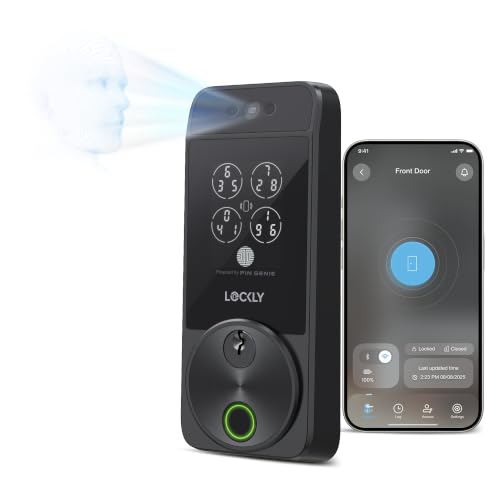
- WALK IN HANDS-FREE WITH FACIAL RECOGNITION: Never fumble for keys with your hands full of groceries. Powered by dual-infrared 3D sensors and radar detection, Lockly Visage recognizes your face in milliseconds under any lighting—even complete darkness. All facial data is encrypted and stored locally on-device, offering instant keyless entry door lock convenience with absolute privacy.
- SEAMLESS APPLE HOME KEY INTEGRATION: Unlock your front door with a simple, natural tap of your iPhone or Apple Watch—even if your device battery runs out. Fully compatible with Apple Home, Siri, Amazon Alexa, and Google Assistant, this Apple Home Key smart lock lets you ask your voice assistant to unlock for guests or build effortless smart home automation routines.
- 0.2S AI FINGERPRINT & PATENTED ANTI-PEEP KEYPAD: Experience lightning-fast biometric door lock access with an AI self-learning 3D fingerprint sensor (stores up to 99 prints) that gets smarter over time—perfect for kids and seniors. Integrated with Lockly’s patented PIN Genie touchscreen that randomly shuffles pin locations, this passcode door lock with keypads prevents neighbors or shoulder-surfers from peeking at your code. 6 ways to unlock ensure you're never locked out.

- 3-in-1 Design: Smart deadbolt lock, video doorbell, and 2K HDR camera in one device. Lock/unlock remotely, see visitors, and get motion or doorbell alerts through the myQ app.
- Face Access: Hands full? Your door unlocks automatically using facial recognition, no keys or phone needed. * *Face Access and fingerprint recognition are not available in Illinois, Texas, or outside the U.S. and Canada.
- 24/7 Visibility: 2K HDR video, wide-angle lens, and color night vision let you see every detail day or night.

- Your Face is Your Key: Unlock your smart lock for front door effortlessly with Lockly Visage’s advanced facial recognition technology - just walk up, and the lock detects your face to open automatically. Dual infrared sensors ensure accuracy in any lighting, even at night. Your facial data is encrypted and stored securely on the device, ensuring privacy and safety for your home.
- Unlock Your Home Effortlessly: Enjoy seamless smart home integration with Apple Home Key. Unlock your door with a simple tap on your iPhone or Apple Watch, even when your device is out of power. Manage and share access for guests, ask Siri to unlock, and set up automations directly within the Apple Home app for ultimate convenience.
- Self-Learning AI Fingerprint & 6 Ways to Unlock: Experience lightning-fast access with a 3D biometric sensor enhanced by AI learning-recognizing fingerprints in just 0.2 seconds while storing up to 99 prints. Perfect for everyone, including the elderly and children. Unlock via fingerprint, Lockly Home app, keypad, physical key, Apple Watch, or Alexa/Google Voice Assistant for versatile keyless entry.

- Capture images from camera or load from gallery
- Compare detected faces with face recognition database

- CORRECT MISTAKES WITHOUT ERASING THE ORIGINAL RECORD: Missed punch or incorrect entry? Make corrections before payroll while keeping the original clocking history available for review. Manual entries, device punches, punch types, timestamps, and verification methods remain distinguishable, helping create a more transparent attendance record.
- APP-BASED + 5S FAST CONNECTION: Connect in about 5 seconds and manage employees, attendance rules, punch records, corrections, and reports through the Tymelix app. Handle everyday attendance tasks from one simple mobile interface for faster review and easier payroll preparation.
- DIFFERENT ATTENDANCE RULES FOR DIFFERENT DEPARTMENTS: Create departments and set different attendance rules for each team based on how they work. Customize break time, lunch deductions, overtime, revision zones, and work-hour formats by department. Tymelix also supports department transfers, overnight shifts, tip tracking, and 4 practical reports for attendance review and payroll preparation.

- 𝐂𝐥𝐨𝐮𝐝 𝐒𝐲𝐬𝐭𝐞𝐦 𝐅𝐚𝐜𝐞 𝐀𝐭𝐭𝐞𝐧𝐝𝐚𝐧𝐜𝐞: TIMOZIA Face Attendance Machine allows employees to punch attendance using facial recognition, providing a fast, secure, and contactless clock-in and out experience. With its mobile app integration, staff can clock in directly from their phones within the machine’s Bluetooth range. The system is fully cloud-based, ensuring that all attendance logs are stored safely online and can be accessed anytime, from anywhere, eliminating concerns about data loss or manual backups.
- 𝐂𝐮𝐬𝐭𝐨𝐦 𝐒𝐡𝐢𝐟𝐭𝐬, 𝐋𝐞𝐚𝐯𝐞 & 𝐇𝐑 𝐌𝐚𝐧𝐚𝐠𝐞𝐦𝐞𝐧𝐭: The system supports customizable work shifts, leave applications, and pay periods in one user-friendly platform. Employees can submit leave requests directly through the app, with all data automatically synced in real time. HR teams can remotely track attendance, monitor clock-in and clock-out times, and manage absences with full control. The system is compatible with both iOS & Android mobile apps. Also, for desktop users, we offer a web version where all types of data can be accessed and managed easily.
- 𝐒𝐦𝐚𝐫𝐭 𝐒𝐚𝐥𝐚𝐫𝐲 & 𝐌𝐮𝐥𝐭𝐢-𝐁𝐫𝐚𝐧𝐜𝐡 𝐒𝐮𝐩𝐩𝐨𝐫𝐭: It can automatically calculates salaries based on employee attendance data, saving valuable time and reducing errors. Each device supports up to 100 employees, while multi-branch functionality allows you to scale without limits, making it ideal for growing teams, chain stores, and multi-location businesses all managed in one unified platform for efficient clock-in and clock-out operations.
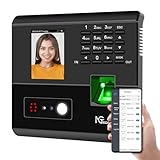
- 4-in-1 Time Clock: Features four verification modes—facial recognition, fingerprint, RFID card and PIN—to effectively prevent buddy punching and attendance disputes. This smart attendance clock auto-calculates work hours accurately, reduces manual errors, ensures fair payroll, and lowers daily admin costs.
- Remote Control & Auto Reports: Manage the time clock via the free NGTeco App for iOS and Android (same local network required, no web access). Easily check real-time attendance, adjust shifts, and export detailed attendance records with one click.
- Flexible Shift Management: Supports flexible scheduling and night shift settings. Easily adjust shift rules to simplify HR scheduling and boost overall work efficiency.

Finding the Right Facial Recognition App: Your Smart Guide
Facial recognition apps are getting super popular. They can do many cool things, like unlock your phone or even help you find old photos of your friends. But with so many apps out there, how do you pick the best one? This guide will help you find the perfect facial recognition app for your needs.
1. Key Features to Look For
When you’re shopping for a facial recognition app, keep an eye out for these important features:
- Accuracy: Does the app recognize faces well, even if someone is wearing glasses or has changed their hairstyle? The best apps are very accurate.
- Speed: How fast does the app work? You don’t want to wait a long time for it to recognize a face.
- Ease of Use: Is the app simple to understand and use? You shouldn’t need to be a computer whiz to figure it out.
- Privacy Controls: This is super important! Does the app let you control who sees your face data? Good apps protect your privacy.
- Extra Features: Some apps can do more than just recognize faces. They might help you tag friends in photos, organize your gallery, or even create fun effects.
2. Important “Materials” (What Makes it Work)
Facial recognition apps don’t use physical materials like a chair or a toy. Instead, they use:
- Algorithms: These are like secret recipes that tell the app how to “see” and understand faces. The better the recipe, the better the app.
- Databases: The app needs to learn from lots of faces. It uses large collections of face information to get smarter.
- Your Device’s Camera: The app uses your phone or tablet’s camera to capture images of faces.
3. Factors That Affect Quality
A few things can make a facial recognition app work better or worse:
- Lighting: Bright light or very dark conditions can make it harder for the app to see faces clearly.
- Face Angle: If a face is turned too far to the side, the app might have trouble recognizing it.
- Facial Features: Things like beards, makeup, or masks can sometimes trick the app.
- App Updates: Developers often update apps to make them better. Regular updates usually mean a higher quality app.
4. User Experience and Use Cases
How you use the app and how it feels to use it are also important.
User Experience:
A good user experience means the app is:
- Intuitive: You know what to do without reading instructions.
- Responsive: It doesn’t freeze or crash.
- Pleasant to Look At: The design is clean and easy on your eyes.
Use Cases:
Here are some ways you might use a facial recognition app:
- Unlocking Your Phone: Many phones use facial recognition to let you unlock them quickly.
- Organizing Photos: Some apps can group photos by the people in them, making it easy to find pictures of your family or friends.
- Security: In some cases, facial recognition can be used for secure access to buildings or accounts.
- Fun Apps: There are apps that use facial recognition for games or to add funny filters to your face.
Frequently Asked Questions (FAQ) About Facial Recognition Apps
Q: What is facial recognition?
A: Facial recognition is a technology that identifies or verifies a person from a digital image or a video frame. It compares facial features from the image to faces within a database.
Q: Are facial recognition apps safe to use?
A: Most reputable facial recognition apps are safe if they have good privacy policies. Always check the app’s privacy settings and read reviews before using it.
Q: Can facial recognition apps recognize me if I change my appearance?
A: It depends on the app. Some apps can still recognize you if you have a haircut or wear glasses, while others might struggle.
Q: How accurate are facial recognition apps?
A: The accuracy varies greatly. Top-tier apps can be very accurate, but factors like lighting and face angle can affect results.
Q: Do I need a good internet connection for these apps?
A: Some apps need an internet connection to work, especially if they use cloud-based databases. Others can work offline.
Q: Can I use facial recognition to find people online?
A: Some apps can help you find people if they have public profiles and their face is in the app’s database. However, this is not always reliable or ethical.
Q: What happens to the pictures my app takes?
A: This is determined by the app’s privacy policy. Good apps will store your data securely or delete it after use. Always check their rules.
Q: Can facial recognition apps be fooled?
A: Yes, sometimes they can be fooled by masks, very different lighting, or even a clear photo of someone else.
Q: Are there free facial recognition apps?
A: Yes, there are many free facial recognition apps available. However, some premium features might require payment.
Q: How can I improve the facial recognition on my phone?
A: Make sure the camera lens is clean. Try to set up facial recognition in good lighting, and follow the app’s instructions carefully.

Hi, I’m Tom Scalisi, and welcome to The Saw Blog! I started this blog to share my hands-on experience and insights about woodworking tools—especially saws and saw blades. Over the years, I’ve had the chance to work with a wide range of tools, and I’m here to help both professionals and hobbyists make informed decisions when it comes to selecting and using their equipment. Whether you’re looking for in-depth reviews, tips, or just advice on how to get the best performance out of your tools, you’ll find it here. I’m excited to be part of your woodworking journey!