
Have you ever spent your entire morning commute fiddling with your car’s audio settings, only to end up with sound that is still flat, tinny, or distorted? We have all been there. You want your favorite songs to sound like a live concert, but the endless menus of treble, bass, and mid-range sliders feel more like a complex science experiment than a simple music player.
The problem is that most factory car radios come with generic settings that do not match the unique acoustics of your vehicle or your personal taste in music. Adjusting these levels can feel overwhelming, especially when you are worried about accidentally making the audio quality worse. Many drivers simply give up and settle for “good enough,” missing out on the full potential of their car’s sound system.
In this guide, we will take the mystery out of your car’s audio menu. You will learn exactly what each setting does and how to balance them for a crisp, professional sound. Whether you love heavy bass or clear vocals, these simple tips will help you customize your listening experience in minutes. By the end of this post, you will be able to transform your daily drive into a premium audio experience. Let’s dive into the settings and unlock the true power of your car’s speakers.
Top Car Radio Settings Recommendations

- 【High Quality Car Stereo Player】- Our double din car stereo size with 7.01"(L)*3.94"(W)2.56"(H), please check the size of your car's radio before ordering. 7inch double din car stereo with 1024*600 Full HD touch screen gives you a fantastic experience. You can enjoy the stream music and the clear picture with your family. Hope you have a good time.
- 【Double Din Car Stereo Phone Mirror Link】- Support mirrorlink and navigation function for most the android cell phone and iPhone, you can connect your smartphone to car audio via a smartphone data cable, easily connect and sync any content (such as video, music, GPS Navigation etc) to the car player displayed on a large screen. Note: the stereo player is not a GPS unit, it gets GPS navigation function by connecting to the cellphone.
- 【7 inch Double Din Car Radio With Bluetooth 5.0 and FM 】- Bluetooth 5.0 and microphone allow you to answer callings, listen to music and media sounds from devices with Bluetooth function. Take Phone Call Hands Free - Free both your hands by dialing and listening to a call on radio by BT connection. It will ensure the safety of your way. High-quality FM radio stereo receiver, three kinds of channel search mode, listen to music, news and traffic information, anywhere and enjoy yourself.

- 🚗【Perfect Fit for Your Vehicle】: This advanced 10-inch in-dash GPS navigation head unit is compatible with Honda CRV 2012 2013 2014 2015 2016. Be sure to verify your vehicle’s model and dashboard configuration before placing your order for this Honda CRV car stereo.
- 🚗【Powerful Functions】: Upgrade your driving experience with our car stereo, featuring an Android 15 system powered by a 8-Core CPU. With 4GB RAM and 128GB ROM, this system ensures a smooth, responsive user experience. Enjoy features like CarPlay, Android Auto, GPS navigation, Bluetooth connectivity, FM radio, EQ settings, WiFi connection, backup camera support, audio/video output, AUX input, an external microphone, and steering wheel control for seamless operation.
- 🚗【Effortless Connectivity with CarPlay & Android Auto】: This Android 15 car stereo supports both wired and wireless Apple CarPlay and Android Auto connections. Use the USB cable for a reliable wired connection or connect wirelessly via Bluetooth for easy access to your phone's apps. Activate voice assistants like Siri or Google Assistant to manage GPS navigation, calls, messages, music, and other functions hands-free, ensuring a safer driving experience.

- Carplay & Android Auto with Voice Control:Stay connected and in control with the single din car radio that offers full compatibility with both iOS and Android systems. Effortlessly access map navigation, notifications, emails, contacts, music, and videos through Bluetooth or USB connection. With advanced voice control, you can safely operate all functions hands-free, keeping your focus on the road for enhanced driving safety
- Mirror Link for Enhanced Entertainment:Expand your in-car entertainment options with Mirror Link functionality. This carplay car stereo mirrors your smartphone's display - both iOS and Android - onto the large 9-inch screen, synchronizing picture and sound perfectly. Enjoy your favorite apps like G00gle Maps, Y0uTube directly from your car's display.
- 9-inch Touch Screen with Customization: Customize your interface with seven-color backlighting and multiple desktop themes. The unit supports USB audio and video inputs while charging your devices. Please note: This single din car stereo measures 178100*50mm - verify your dashboard dimensions before purchase.

- Wireless Apple CarPlay & Android Auto: Connect your iPhone or Android device wirelessly or via cable. Access navigation apps like Google Maps, Waze, or Apple Maps, stream music, and make hands-free calls directly on the car screen
- Bluetooth 5.2 Connectivity: Enjoy stable, fast, and long-range Bluetooth connection for music streaming and hands-free calls. Pair multiple devices easily without signal drops. Compatible with all Bluetooth-enabled smartphones, this car stereo ensures smooth and reliable connectivity every time
- FM & AM Radio with 10-Band EQ: Access your favorite FM/AM stations with crystal-clear sound. The built-in 10-band equalizer allows you to customize audio settings, from bass to treble, providing a personalized listening experience for music, news, or talk shows

- Wireless CarPlay & Android Auto: Simply connect your phone via Bluetooth for instant access to music, maps, and messages - all displayed on your 7" car stereo screen. Use voice commands with Siri/Google Assistant to stay hands-free and focused on the road
- Ultra-Clear QLED Display: Feast your eyes on a 7" QLED screen with 1280×720 resolution, can support 1080P video playback with vivid colors and razor-sharp details. Whether you're streaming movies or checking maps, every image pops with stunning clarity - day or night
- 4.2-Channel Stereo Surround Sound System: Experience studio-quality audio with 4.2-channel output (Rear Right/Left Speaker, Front Right/Left Speaker output + Dual Subwoofers), delivering rich, balanced sound and powerful bass. Fine-tune your music with custom EQ settings for the perfect soundstage. Built with high-performance components for crisp, distortion-free audio at any volume. Perfect for audiophiles who demand concert-like sound on the road

- Seamless Bluetooth Connectivity: Car stereo with Bluetooth technology allows you to enjoy hands-free calling and high-quality wireless music streaming from your iPhone and Android devices.
- Powerful, Clear Audio Performance: Equipped with a built-in MOSFET amplifier, this Pioneer car stereo delivers up to 50 watts per channel to four speakers for rich, dynamic sound across your entire vehicle.
- High-Quality Music Playback via USB: Enjoy clear, detailed sound from your favorite tracks using the front USB input—compatible with FLAC, MP3, and WMA formats.
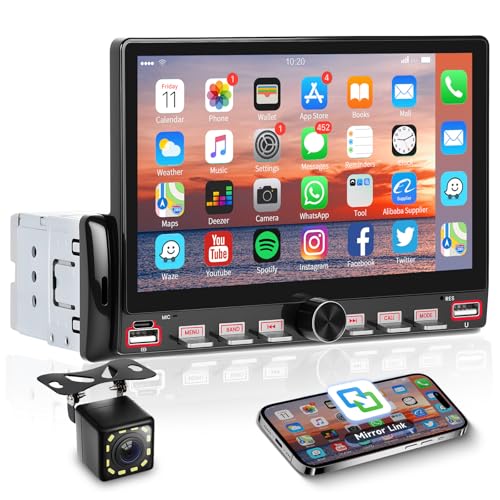
- Premium Tactile Control and 7-Inch Piano Keys Buttons: The Single din car radio features distinctive Piano Key Buttons for essential, blind-operation control with satisfying tactile feedback. This is complemented by a brilliant 7-inch car radio touch screen 1 din, creating a dual-control cockpit that is both intuitive for complex tasks and instantly reliable for basics like volume, ensuring a safe feel
- Effortless Connectivity: This advanced Bluetooth car stereo offers crystal-clear hands-free calls and wireless music streaming. For full app integration, use Wired Mirror Link to safely navigate phone apps on the big screen. With Multi-function USB and Type-C Charging, your devices stay connected, powered, and ready for the road ahead
- A Personalized Audio Sanctuary: Fine-tune every note with the built-in EQ and fuel your journey with entertainment from FM Radio, or U-disks. Personalize further with Color-backlight settings to match your car's mood. The sophisticated New UI Display and Piano Key design make interacting with your media a truly pleasurable experience

- Universal Double Din Car Stereo:Size--178(L)*63(W)*100(H)mm/7.01(L)*2.48(W)*3.94(H)in.Compatible with all cars of various brand, just MAKE SURE the control panel on your car is larger than the item size before ordering
- HD Touchscreen Car Radio: 7 inch TFT HD Digital Multi-color touch screen, 800 x 480 screen resolution, support 1080P video playback, give you a fantastic experience. Come with a back up camera and a steering wheel control, help your driving and parking safer and more convenient
- Phone Mirror Link: Support Android/ iphone Mirror Link, through phone's original USB cable can synchronized to the on-board screen (Support Android 10.0 and below,iOS 15.0 and below) Note: the stereo player is not a GPS unit, it gets GPS navigation function by connecting to the phone
The Ultimate Guide to Mastering Your Car Radio Settings
Getting the best sound in your car is about more than just buying expensive speakers. You need to know how to adjust your radio settings correctly. Whether you are a music lover or just want clear audio for your podcasts, these tips will help you get the most out of your vehicle’s sound system.
Key Features to Look For
Modern car radios come with many settings. You should look for a system that offers an Equalizer (EQ). This allows you to change the bass, mid-range, and treble levels. Another important feature is the Fader and Balance control. This lets you move the sound to specific speakers, like the front or back of the car. Look for radios that offer Bluetooth or smartphone integration, as these often provide an app to control your sound settings easily.
Important Materials and Hardware
While the “settings” are digital, the hardware they control relies on quality materials. High-end car radios use better internal processors to decode audio signals without distortion. The wires connecting your radio to the speakers should be made of high-grade copper. This ensures that the signal stays clean as it travels through your car. If your radio has a touchscreen, look for one with a responsive, scratch-resistant glass surface for easier navigation.
Factors That Improve or Reduce Quality
- Source Quality: If you play low-quality digital files, your sound will suffer. Always try to use high-quality streaming or CDs.
- Cabin Noise: Road noise can drown out your music. Sound-deadening materials in your car doors can significantly improve how your settings sound.
- Volume Levels: Pushing the volume to the absolute maximum often causes “clipping.” This creates a harsh, distorted sound that can damage your speakers over time.
- Placement: Where your speakers are located matters. Proper balance settings help fix the sound if you are sitting far from one of the speakers.
User Experience and Use Cases
Adjusting your radio settings changes your daily commute. If you are on a long road trip, you might want a “V-shape” EQ setting, which boosts bass and treble for a more exciting sound. If you are listening to talk radio or audiobooks, you should boost the mid-range settings to make voices sound clearer. Spend some time sitting in your parked car to test different levels. Once you find a setting you like, save it as a preset so you can switch back to it quickly.
10 Frequently Asked Questions
Q: What is the EQ setting?
A: The EQ, or Equalizer, lets you adjust the volume of specific sound frequencies to change the tone of your music.
Q: Should I turn the bass all the way up?
A: It is better to keep bass at a moderate level. Too much bass can cause distortion and make the music sound muddy.
Q: What does the “Fader” do?
A: The fader shifts the volume between the front and back speakers.
Q: What is “Balance”?
A: Balance adjusts the sound between the left and right sides of the car.
Q: Why does my music sound distorted at high volumes?
A: The speakers are likely reaching their limit, or the audio source is compressed too much.
Q: Can I save my settings?
A: Most modern car radios allow you to save custom EQ profiles as presets.
Q: Does Bluetooth affect sound quality?
A: Older Bluetooth versions might compress audio, but modern versions provide very clear, high-quality sound.
Q: How do I make voices sound clearer?
A: Increase the “Mid” or “Mid-range” settings on your equalizer.
Q: Is a touchscreen radio better?
A: Touchscreens are easier to use for deep menu settings, but physical knobs are often safer to adjust while driving.
Q: How often should I change my settings?
A: You can change them whenever you switch between music genres, but most people find one “sweet spot” and stick with it.

Hi, I’m Tom Scalisi, and welcome to The Saw Blog! I started this blog to share my hands-on experience and insights about woodworking tools—especially saws and saw blades. Over the years, I’ve had the chance to work with a wide range of tools, and I’m here to help both professionals and hobbyists make informed decisions when it comes to selecting and using their equipment. Whether you’re looking for in-depth reviews, tips, or just advice on how to get the best performance out of your tools, you’ll find it here. I’m excited to be part of your woodworking journey!