
Do you have a dusty laptop sitting in your closet that feels more like a paperweight than a computer? You are not alone. Millions of older machines are abandoned simply because modern operating systems have become too heavy and slow for them to handle. Watching your screen stutter while you try to open a single web page is incredibly frustrating, but that old hardware still has plenty of life left inside.
The real challenge is finding the right software to wake these machines up. The world of Linux is vast, and sorting through hundreds of different versions can feel overwhelming. Many users worry about technical jargon or complicated installations that seem impossible for a beginner. Without the right guidance, it is easy to pick a system that is still too demanding for your aging processor or limited memory.
In this post, we will cut through the confusion and highlight the best lightweight Linux distributions designed specifically for older hardware. You will discover how to breathe new speed into your device, improve your security, and save money by avoiding an unnecessary upgrade. By the time you finish reading, you will have the confidence to turn your sluggish relic into a snappy, reliable machine once again.
Let’s explore the best options to get your computer running like new.
Top Linux For Old Computers Recommendations

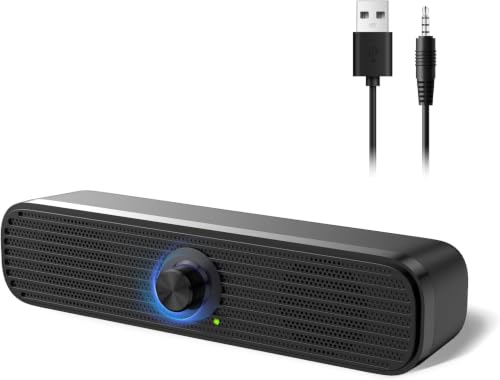
- Wide Compatibility: The 1Mii Computer Speakers can work with any devices that has a standard 3.5mm AUX audio out jack, any brands or models of Windows(7/8/10/11) or Linux PCs, MacOS laptops, desktop monitors, laptops.
- Enhanced Stereo Sound: Built-in dual 3W stereo speakers of the desktop speakers can deliver you loud, clear vocals and all the details you want to hear clearly, providing immersive Hi-Fi audio listening and immersive gaming experience. The 3.5mm wired speaker is perfect for you to enjoy wonderful movies, videos, music and games. For best audio quality, use a USB power adapter to reduce static.
- Rotary Volume Control Knob: With the front rotary knob of the PC speakers, you can steplessly adjust the volume level as you wish. No matter loud and immersive action movie or quiet and peaceful music, the desk speakers can always satisfy your needs. No need to find out the volume setting on your device and no complicate operations, just rotate and enjoy.

- 【Fast and Stable Network Connection】This USB Wi-Fi adapter for PC delivers blazing-fast speeds of up to 433 Mbps on the 5 GHz band and 150 Mbps on the 2.4 GHz band, perfect for lag-free gaming, streaming, and browsing. Ideal as a Wi-Fi adapter for desktop PC, it ensures a stable connection for both home and office setups.
- 【Built-in Drivers for Hassle-Free Setup】The USB Wi-Fi dongle comes with pre-installed drivers, eliminating the need for CDs or manual downloads. Simply plug this PC Wi-Fi adapter into your desktop or laptop, and it’s ready to use—no technical expertise required!
- 【Broad Compatibility with Windows Systems】Designed as a versatile Wi-Fi adapter for PC, this device supports Windows XP, 7, 8, 10, and 11 (not compatible with Linux/Vista/Mac). Whether you’re upgrading an old desktop PC or a modern laptop, this USB Wi-Fi adapter for desktop PC seamlessly integrates into your workflow.
- 1. 9-in-1 Linux:32GB Bootable Linux USB Flash Drive for Ubuntu 24.04 LTS, Linux Mint cinnamon 22, MX Linux xfce 23, Elementary OS 8.0, Linux Lite xfce 7.0, Manjaro kde 24(Replaced by Fedora Workstation 43), Peppermint Debian 32bit (being replaced by MX Linux 32bit) for older PC, Pop OS 22, Zorin OS core xfce 17. The versions you received might be latest than above as we update them to latest/LTS when we think necessary.
- 2. Try or install:Before installing on your PC, you can try them one by one without touching your hard disks.
- 3. Easy to use: These distros are easy to use and built with beginners in mind. Most of them Come with a wide range of pre-bundled software that includes office productivity suite, Web browser, instant messaging, image editing, multimedia, and email. Ensure transition to Linux World without regrets for Windows users.

- 【7-in-1 Card Reader】This multi memory card reader satisfies your need of almost every single card. There are 1*CF slot, 2*SD, 1*TF, 1*Micro SD, 1*XD, 1*MS at your choice and convenience. What’s more, this card reader can read and write 5 different cards at the same time, which can greatly improve your work efficiency.
- 【2 in 1 Design】USB C and USB3.0 connector design provides a more efficient access to laptops, tablets and phones by USB-A or USB-C slot. Plug to play, easy to operate and no extra driver needed. Compatible with most systems--Mac OS, Android, Linux, Chrome OS, Windows XP/Vista/7/8/8.1/10,11,etc.
- 【5Gbps Super Speed Transfer】5Gbps data transfer, finished in a blink. You can transfer your images and videos from your card to the computer soon, save a lot of time and improve your work efficiency. Also the USB3.0 card reader is compatible with the USB2.0/1.1 Port.


- LINUX MINT CINNAMON: Latest version of the popular Linux Mint OS featuring the sleek and intuitive Cinnamon desktop environment. With Linux Mint you are in control, enjoy a fast, reliable OS that respects your privacy. Cinnamon desktop offers a familiar, polished experience ideal for both new and experienced Linux users.
- 64-BIT COMPATIBILITY: Fully compatible with Intel 64-bit and AMD 64-bit processors. It uses less system resources than other Operating Systems, making it great choice for old or new computers.
- BOOTABLE DVD DISC: Ready-to-use bootable DVD allows you to boot (start) to a live version of Linux Mint Cinnamon so you can try it and experience it before you decide to install.
- 【PLUG & PLAY – EASY CONNECTION】 Simply connect the Amicool External DVD Drive to your computer’s USB or Type-C port, and it will usually be detected right away without the need for extra drivers. For stable operation and sufficient power, we recommend connecting it directly to a USB port on your computer (for desktops, use a rear motherboard port) and avoiding USB hubs or extension cables. This user-friendly design ensures quick setup for both beginners and professionals.
- 【FAST & STABLE DATA TRANSMISSION】 Featuring dual interfaces (USB 3.0 and Type-C), this optical drive supports data transfer speeds up to 5Gbps. To ensure a reliable connection, please connect it directly to your computer. The drive supports multiple disc formats such as DVD+R, DVD-R, CD-R, and CD-RW. Please note: It does NOT support DVD-RAM, Blu-ray (BD) discs, or certain proprietary formats. Maximum DVD read speed is 8x, and maximum CD read/write speed is 24x.
- 【UNIVERSAL COMPATIBILITY】 Compatible with Windows 11 / 10 / 8.1 / 7, Linux, and all macOS (Intel & Apple Silicon) for MacBook Air/Pro, iMac, Mac mini; NOT for iPad/iPhone/Apple TV/ChromeOS; for Mac, insert disc FIRST, connect directly to USB port (use a POWERED USB‑C hub for M1/M2/M3 to avoid insufficient power), and open media with VLC Player (Apple DVD Player not supported). Works with most computers from brands like Apple, Dell, HP, Lenovo, ASUS, Acer, and Samsung. 👉 Important: Designed specifically for computers. It is NOT compatible with TVs, tablets, game consoles (e.g., PlayStation, Xbox), car stereos, or standalone Blu-ray players.
The Ultimate Guide to Reviving Old Computers with Linux
Many people throw away old computers because they run slowly. You do not need to buy a new machine. Linux is a powerful operating system that can make your old laptop or desktop feel brand new again. This guide helps you choose the best Linux version for your specific hardware.
Key Features to Look For
When choosing a Linux version for an old computer, keep it simple. Look for “lightweight” distributions. These versions use very little memory, or RAM. A good choice will include a “Desktop Environment” that is not fancy. Avoid versions with heavy animations or 3D effects. These features slow down older processors. Look for versions that support 32-bit hardware if your computer is more than 15 years old.
Important Technical Requirements
The most important part of your computer is the RAM. Most Linux versions for old computers need at least 2GB of RAM to run well. If you have less, look for “ultra-light” versions like Puppy Linux or AntiX. You should also check your hard drive. Replacing an old mechanical hard drive with a cheap Solid State Drive (SSD) will make the biggest difference in speed. The SSD acts as a fast storage space for your files and programs.
Factors That Improve or Reduce Quality
Quality in this context means speed and stability. You improve quality by choosing a version that matches your hardware. If you have a very old processor, pick a version without a bloated software suite. You reduce quality when you try to install a version meant for modern gaming PCs. Always check the system requirements on the official website before you download anything. Using a wired internet connection during the setup also improves your experience.
User Experience and Use Cases
Linux is perfect for basic tasks. You can use an old laptop to browse the web, write documents, or watch videos. Many users turn their old machines into dedicated media centers for the living room. Others use them as learning tools for children. The experience is usually fast and reliable. You will notice that your computer stays cooler and runs quieter than it did with older operating systems.
Frequently Asked Questions
Q: Will Linux delete my old files?
A: Yes, it might. Always back up your important photos and documents to a USB drive before you start the installation.
Q: Is Linux hard to learn?
A: Not at all. Many versions look and feel just like the operating systems you already know.
Q: Can I still use the internet?
A: Yes. Linux comes with modern web browsers like Firefox. These browsers work great on older machines.
Q: How much does Linux cost?
A: Linux is free. You can download it from the internet without paying a single penny.
Q: What if I make a mistake?
A: You can simply try to install the system again. Since the software is free, you have nothing to lose.
Q: Do I need a fast internet connection?
A: You need a decent connection to download the installer file. Once it is installed, you do not need fast internet to use the computer.
Q: Is my computer too old for Linux?
A: Almost no computer is too old. If it can turn on, there is likely a version of Linux that will run on it.
Q: Can I play games?
A: You can play simple games. Do not expect to play the newest high-end video games on an old computer.
Q: How long does the installation take?
A: Most installations take between 20 and 40 minutes. It is a quick way to save your hardware.
Q: Where do I get help?
A: There are huge online communities. If you have a question, someone else has likely already solved it on a forum.

Hi, I’m Tom Scalisi, and welcome to The Saw Blog! I started this blog to share my hands-on experience and insights about woodworking tools—especially saws and saw blades. Over the years, I’ve had the chance to work with a wide range of tools, and I’m here to help both professionals and hobbyists make informed decisions when it comes to selecting and using their equipment. Whether you’re looking for in-depth reviews, tips, or just advice on how to get the best performance out of your tools, you’ll find it here. I’m excited to be part of your woodworking journey!