
Imagine this: You’re deep into a big project, your computer humming along perfectly, when suddenly—BAM! A power surge hits. Your screen goes black, and all your hard work vanishes. It’s a nightmare scenario every computer user fears. Power surges are sudden, unexpected spikes in electrical voltage that can instantly fry sensitive electronics like your PC, monitor, and external drives. It’s not just about losing data; replacing expensive hardware is a major headache.
Navigating the world of surge protectors can feel overwhelming. Do you need more joules? What about the clamping voltage? These technical terms make choosing the right defense feel like a guessing game. You want solid protection without overspending, but the sheer volume of choices often leaves people confused or, worse, under-protected.
This guide cuts through the confusion. We will break down exactly what a surge suppressor does and how to pick the perfect one for your setup. By the end of this post, you will understand the key features that truly matter, ensuring your valuable electronics stay safe from electrical villains. Keep reading to become a surge protection pro and secure your digital life!
Top Surge Suppressor For Computers Recommendations

- SHIPMENT CONTAINS: 12-outlet surge protector power strip with 8-foot extension cord delivers reliable electricity and safeguards electronics from surges and outages
- ENHANCED SAFETY: 15 amp circuit breaker and PC flame-retardant material for added protection; 4000 joules surge protection
- SECURE OUTLETS: Safety shutters help prevent incorrect use of outlets for household safety

- With 3420 Joules of premium surge protection, you can power and protect up to 8 devices at once. Rest easy, 3420J will protect all your expensive electronics for a long time.
- Low profile design is easily concealable behind or under furniture. Not using an outlet? The built-in safety covers keep your neighbor's kid from jamming paper clips into it.
- Keeps your gear running better, longer by filtering harmful signals out of your power supply. Built with fire-proof MOVs (they absorb the extra voltage) to keep your house safe.

- All the Power You Need: Features 12 AC outlets, 1 USB-C port, and 2 USB-A ports to power appliances, mobile devices, and more. Total USB output is shared across all USB ports, with a maximum output of 15W.
- Fast Charge Your iPhone: Use the 20W USB-C port to give your iPhone 15 a high-speed charge from 0-50% in just 26 minutes.
- 8-Point Safety System: Combines surge protection, fire resistance, overload protection, temperature control, and more to protect you and your devices.

- MULTI-OUTLET SURGE PROTECTOR: Power everything on your desk with a single compact surge-protected extension cord. 12 AC outlets with surge protection charge your computer, laptop, phone, camera, and more. It's one charging station for a clutter-free desk.
- POWER BAR W/ PHONE LINE PROTECTION: 1-in-2-out RJ11 telephone or fax protection ensures open, continuous phone line connections, plus coaxial cable protection to safeguard cable box and satellite connections. Protects circuits from fire, impact, and rust.
- SAFEGUARD YOUR DEVICES & APPLIANCES: This extender has been run through extensive testing to ensure your expensive computers, monitors, hard drives, home theaters, and other appliances are protected by 4,156 joules of overcurrent and overload protection.
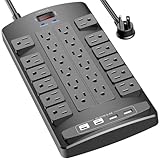
- 【Power Strip with 24 Outlets & 4 USB Ports】: 24AC Outlets & 4 USB Ports, Power Strip with 6 feet Flat Plug Heavy Duty Power Extension Cord, Surge Protector(4100 Joules) with overload protection protects against spikes and fluctuations, Lots of outlets for a computer desk works great for all the electronics a gamer needs.
- 【Smart USB Fast Charging Ports】: 4 USB Charging Ports, Each USB A port features 2.4A Max output. USB C charging port features 3A MAX. Built- with smart technology, detecting charging devices and deliver optimal charging speed automatically, compatible with most USB devices. NOTE: The UCB-C port doesn't support any other devices which need 9~22V charging voltage.
- 【24 AC Surge Protector Outlets】: This power Strip provides 4100 joules of surge protection for electronic devices and serves as a reliable power extension cord(The “Protected” indicator light turns on to indicate that your devices are protected).

- MULTI-OUTLET SURGE PROTECTOR LETS YOU CHARGE & POWER MULTIPLE DEVICES AT ONCE: Power everything on your desk with a single compact surge-protected extension cord. 12 AC outlets with surge protection charge your computer, laptop, phone, camera, and more.
- POWER BAR W/ PHONE LINE PROTECTION: 1-in-2-out RJ11 telephone or fax protection ensures open, continuous phone line connections, plus coaxial cable protection to safeguard cable box and satellite connections. Protects circuits from fire, impact, and rust.
- SAFEGUARD YOUR DEVICES & APPLIANCES WITH 4,320 JOULES OF PROTECTION: Extensive testing ensures your expensive computers, monitors, hard drives, home theaters, and other appliances are protected by 4,320 joules of overcurrent and overload protection.
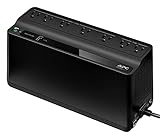
- KEEP YOUR COMPUTER, WI-FI AND ROUTER RUNNING THROUGH POWER OUTAGES: Supplies short-term battery power during outages to maintain internet connectivity and allow safe shutdown of computer during power interruptions
- POWER PROBLEMS DON'T ONLY HAPPEN DURING STORMS: 23 minutes of runtime (at 100W load) guards against outages, while surge protection shields connected devices from unexpected power events that happen even on a normal day
- PROTECT EVERYTHING ON YOUR DESK: 5 well-spaced outlets with full battery backup and surge protection, plus 2 surge-only outlets for less critical gear

- 7 GROUNDED MULTI OUTLETS POWER STRIP: Multi outlet powerstrip with multiple outlets including one wide space for adapters, allowing efficient connection of devices, TV, PC, audio, and studio equipment without blocking adjacent plugs
- 125V VOLTAGE PROTECTOR WITH CIRCUIT SAFETY: Designed for 125V systems, this surge protector power strip helps manage overload and voltage fluctuations for consistent performance across connected electronics and devices. Do not use with high-voltage systems.
- HEAVY DUTY METAL POWERSTRIP WITH ETL LISTED DESIGN: Industrial-style metal enclosure supports durability in demanding setups, while ETL listed certification reflects tested safety standards for reliable everyday use
Choosing the Right Surge Protector for Your Computer: A Buyer’s Guide
Your computer holds important files and memories. A sudden power spike can destroy it in an instant. A surge suppressor acts like a superhero shield for your electronics. This guide helps you pick the best one.
Key Features to Look For
When shopping, you need to check a few important things on the box. These features tell you how well the protector works.
1. Joule Rating: The Protection Power
The Joule rating shows how much energy the protector can absorb before it fails. Think of Joules as the protector’s strength bar. Higher is better. For a standard desktop computer, look for at least 1,000 Joules. If you have expensive gaming gear or many devices, aim for 2,000 Joules or more.
2. Clamping Voltage: The Speed of Reaction
Clamping voltage is the level of voltage that triggers the surge protector to start working. Lower is better here. Most good surge protectors clamp at 330V or 400V. This means if the voltage goes above this number, the protector steps in quickly.
3. Response Time: How Fast It Reacts
A good surge suppressor reacts almost instantly. You want a response time measured in nanoseconds (billionths of a second). The faster the response, the less power actually reaches your computer.
4. Outlet Count and Spacing
Count how many items you need to plug in (computer, monitor, printer, speakers). Make sure the surge protector has enough outlets. Also, check the spacing. Big plugs (like those on power bricks) can block adjacent outlets if they are too close together.
5. Indicator Lights
Most protectors have lights. One light usually shows that the unit is plugged in. Another light should tell you if the surge protection feature is still working. If the protection light goes out, it means the protector has done its job and must be replaced.
Important Materials and Build Quality
The materials inside matter a lot for safety and longevity.
- Metal Oxide Varistors (MOVs): These are the main components that absorb the excess electricity. Quality MOVs last longer.
- Casing: Look for sturdy, fire-resistant plastic casing. Cheap plastic can melt or catch fire during a massive surge.
- Cord Quality: A thick, heavy-duty power cord suggests better internal wiring and safer power delivery.
Factors That Improve or Reduce Quality
Some features make a surge protector much better, while skipping others lowers its value significantly.
Quality Boosters:
- EMI/RFI Filtering: This feature cleans up “noise” in the electrical line. This noise doesn’t usually destroy hardware, but it can cause strange glitches on your screen or audio issues.
- Coaxial/Phone Ports: If you have an internet cable or phone line running to your computer, having these extra ports protects those lines too.
- Warranty: A long warranty (often 3 years or more) shows the manufacturer stands behind their product.
Quality Reducers:
- Power Strips vs. Surge Protectors: A simple power strip only adds extra outlets. It offers zero protection against spikes. Always check for a Joule rating.
- No Grounding Indicator: If the protector cannot tell you the wiring is wrong (no ground indicator), it cannot protect you fully.
User Experience and Use Cases
How you use the protector affects what you should buy.
- Home Office/Gaming Setup: You need high Joules (2000+) and many outlets for monitors, PCs, and peripherals. Wall-mount designs are often helpful here.
- Laptop Use: A smaller unit with 3-6 outlets might be enough, but ensure it has at least 1000 Joules.
- Entertainment Center: If you protect TVs and game consoles, prioritize surge protectors with wide spacing for bulky adapter plugs.
Remember, surge protectors wear out over time, especially after absorbing a large spike. Always check that the protection indicator light is on!
10 Frequently Asked Questions (FAQ) About Computer Surge Suppressors
Q: What is the difference between a surge protector and a power strip?
A: A power strip just splits one outlet into many. A surge protector has special parts inside that actively block dangerous voltage spikes. Always buy a surge protector for your computer.
Q: How often should I replace my surge protector?
A: If it has never handled a big surge, replace it every 3 to 5 years. If the protection light goes out, replace it immediately, no matter how old it is.
Q: Does a surge protector protect against lightning strikes?
A: It protects against nearby surges caused by lightning hitting power lines. However, a direct lightning strike is so powerful that almost no consumer surge protector can stop it. Unplug your computer during a severe thunderstorm for best safety.
Q: What is a good Joule rating for basic home use?
A: For a basic desktop computer and monitor, a rating between 1,000 and 1,500 Joules is usually adequate protection.
Q: Can I plug a surge protector into another surge protector?
A: No. This is called “daisy-chaining.” It overloads the first protector and creates a major fire risk. Never do this.
Q: What does “clamping voltage” mean?
A: It is the voltage level at which the device starts working to block the excess power. Lower clamping voltage means faster, better protection.
Q: Are the USB ports on surge protectors the same as the main outlets?
A: No. The USB ports usually only offer slow charging. They are generally not rated for surge protection like the main AC outlets are.
Q: Does the surge protector need to be grounded?
A: Yes. Proper grounding is essential. If the unit shows a “ground fault” light, the wiring in your wall outlet is bad, and your protection is severely reduced.
Q: Should I buy a surge protector with a warranty?
A: Yes. Many brands offer a connected equipment warranty. This means if their protector fails and damages your computer, they will pay for the repairs up to a certain dollar amount.
Q: What is EMI/RFI filtering?
A: This feature cleans up electrical “noise” that can cause static or interference in your computer’s sound or video signals. It improves the overall quality of the power delivered.

Hi, I’m Tom Scalisi, and welcome to The Saw Blog! I started this blog to share my hands-on experience and insights about woodworking tools—especially saws and saw blades. Over the years, I’ve had the chance to work with a wide range of tools, and I’m here to help both professionals and hobbyists make informed decisions when it comes to selecting and using their equipment. Whether you’re looking for in-depth reviews, tips, or just advice on how to get the best performance out of your tools, you’ll find it here. I’m excited to be part of your woodworking journey!